
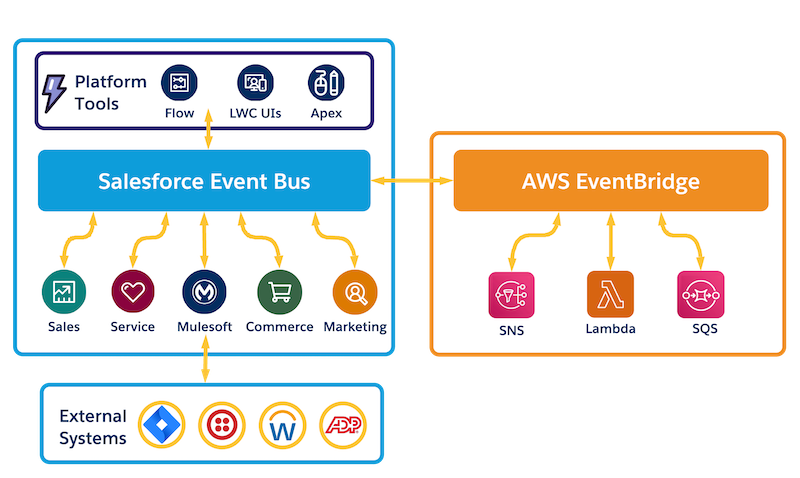
By using Event Relay in Salesforce with Amazon EventBridge in AWS, your Salesforce event-driven apps can use AWS services to process events or send events to third-party and SaaS integrations. You can also send platform events from AWS to Salesforce, where subscribers can process them using Salesforce Platform capabilities.
Required Editions
| Available in: Lightning Experience |
| Available in: Enterprise, Unlimited, and Developer editions. |
| Not Available in: Government Cloud |
Bidirectional Event Flow Between Salesforce and AWS
With Event Relay, you don’t need an integration app to subscribe to events from Salesforce and publish them to AWS. After you set up an event relay, each custom platform event or change data capture event that is published to the Salesforce event bus is automatically forwarded to an event bus in Amazon EventBridge.
Also, you can publish event messages from AWS back to Salesforce using EventBridge API destinations. The bidirectional event flow between Salesforce and AWS enables your event-driven apps to use the capabilities of AWS services and the Salesforce Platform.
Managed Event Stream
Event relay subscribes to the events in the channel and streams them from the Salesforce event bus to EventBridge. Event relay keeps track of the point in the stream where the last event was sent to EventBridge. If transient errors occur, such as connectivity issues, event relay resumes automatically after the errors are resolved. It attempts to resume the event stream from where it left off, if possible. Also, you can monitor the status of your event relays, and can change the status by starting, pausing, and stopping an event relay.
Additional Resources
To learn more about Amazon EventBridge, see What Is Amazon EventBridge? in the AWS documentation. To learn more about event relay and platform events, refer to these resources.
- Video: Salesforce Platform and AWS. This video covers event relays and another product that integrates with Amazon DynamoDB.
- Trailhead: Platform Events Basics
- Trailhead: Change Data Capture Basics
- Platform Events Developer Guide
- Change Data Capture Developer Guide
- Event Integration with Amazon Eventbridge
After creating the event relay in Salesforce, the event relay creates a partner event source in EventBridge. You associate the partner event source with an event bus. After you start the event relay in Salesforce, the event bus in EventBridge receives the events published and relayed from the Salesforce event bus. You can process the received events using AWS services. - Sending Events to Salesforce using API Destinations
After processing the events in AWS, you can publish an event to Salesforce using an API destination. An API destination is an HTTP endpoint that an EventBridge rule can invoke. - Event Relays in Setup
An event relay is a set of event configurations and a connection to a partner event source in Amazon EvenBridge. An event relay streams events from the Salesforce event bus to EventBridge. You can create an event relay in Setup. - Event Channels
An event relay uses an event channel. A channel is a stream of events in the Salesforce event bus. A single channel can contain multiple types of platform events, including real-time event monitoring events, or change data capture events. - Event Relay Security
Event relays send events to Amazon EventBridge securely using HTTP/1.1 with TLS. Event data is encrypted while in transit over the web. Salesforce is a registered partner of Amazon EventBridge and uses EventBridge Partner APIs to send events to Amazon EventBridge. - Event Type, Size, and Features
Check out what event types and features are supported with event relays. - Event Relay Considerations
Keep these considerations in mind when using Event Relay. - Event Relay Allocations
Check out allocations related to the event relays that you can create and events relayed to Amazon EventBridge.