See, manage, reorder, and filter your record-triggered flows with Flow Trigger Explorer.
Flow Trigger Explorer shows all the flows that are associated with a specified object and that run
when a record is created, updated, or deleted. You can navigate between a flow in Flow Builder and
other flows that run under the same circumstances.
Required Editions
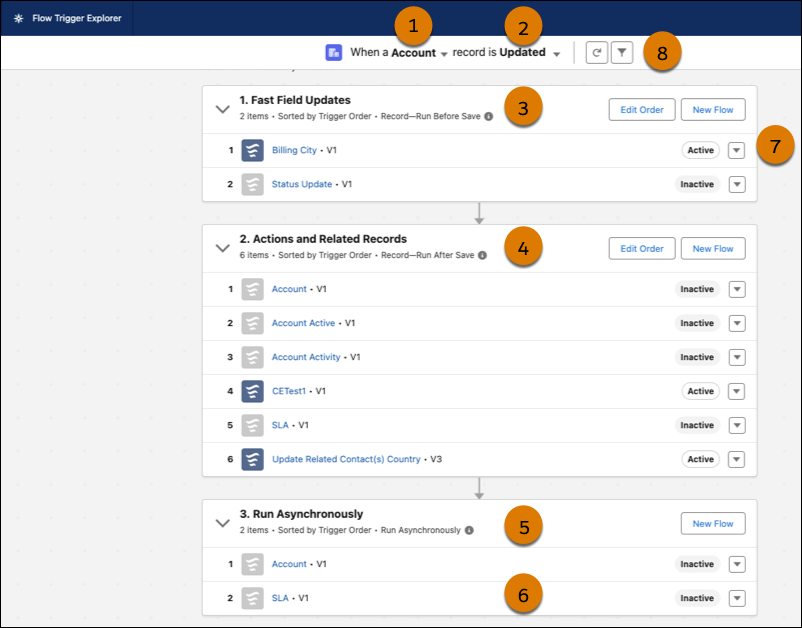
In Flow Trigger Explorer, select an object (1) and a trigger (2) to see flows that run when a
record for that object is created, updated, or deleted. View all the before-save (3) and
after-save flows (4) that run for the same object and trigger. Check the asynchronous paths (5)
that are associated with the flows that run for the same object and trigger. To open the flow in
Flow Builder in a new tab, click the flow label (6). In the dropdown list, select Flow Details
and Versions (7) to see details and activate or deactivate versions of the flow. To open the
filter panel, click the filter icon (8). You can filter by status, package state, or process
type.
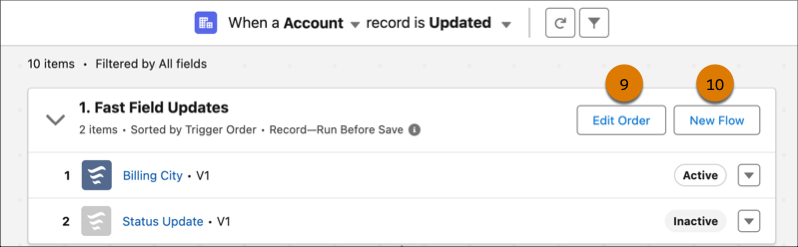
To change the run order, click Edit Order (9) and drag the flows to
the order you want. Reordering changes the flow’s Trigger Order value. The Trigger Order value
determines the flow run sequence for an object’s flows with the same trigger type. You can see
when a Standard flow runs in relation to your other record-triggered flows, but you can’t
reorder it. To create a flow with the same object and record trigger type, click
New Flow (10).
Limitations
You can see when a Standard flow runs in relation to your other record-triggered flows, but
you can’t reorder it.
Record-triggered flows created with a flow template don’t appear in Flow Trigger Explorer.