
External Services maximum system limits for registrations, schema size, operations, objects, properties, and file size.
Required Editions
| Available in: Lightning Experience |
| Available in: Enterprise, Performance, Unlimited, and Developer Editions |
What Are Operations and Objects, Active and Inactive?
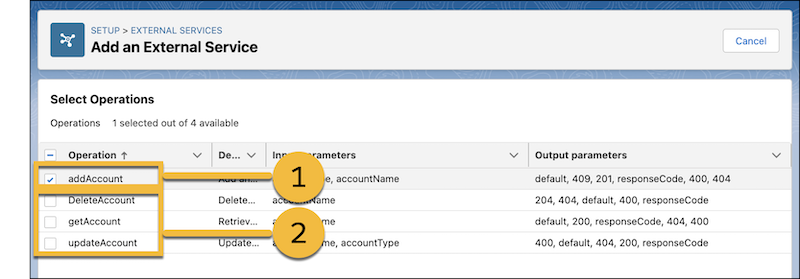
An operation is a schema construct that defines a singular API
capability in terms of an endpoint path and HTTP method, such as GET, PUT, or DELETE. A path
can have several methods, each representing an operation. In the example below, the GET
capability on the /accounts resource is displayed as the
getAccount operation (2). getAccount represents one
operation.
An active operation is an operation that you select to include when you register or edit your schema (1). External Services transforms active operations into invocable actions in Salesforce. Inactive operations are the ones that weren’t selected during registration (2).
An object is any complex data structure that isn’t a simple data type, such as string, integer, date, date time, time, or float.
An active object is an object that’s at least referenced by one active operation in the schema, or if its parent object is active. An inactive object isn’t referenced by an active operation or an active parent object.
Objects can be defined as a named resource in the schema and can be referenced by operations and parent objects for object schema reuse. In this way, multiple operations can use the same object. If one operation is active, but another is inactive, and they use the same object, the object is considered active. An inline object is private to an operation or parent object.
Inactive operations and objects are counted against system limits. Even though they aren’t transformed into invocable actions and dynamic Apex classes, inactive operations and objects consume a certain amount of system resources.
To see counters that track the sum of active and inactive operations and objects in your org, go to the External Services home page in Setup.
Considerations for File Upload and Download
These are the supported binary file types.
- Adobe Acrobat (.pdf)
- Archive files with an extension of .zip or .gzip
- Audio files with an extension of .mpeg or .wav
- Comma-separated values (.csv)
- Image files with an extension of .jpeg, .png, .gif, .bmp, .tiff, or .svg
- Microsoft Excel files with an extension of .xls, .xlt, .xla, or .xls
- Microsoft PowerPoint files with an extension of .ppt, .pot, .pps, .ppa, or .pptx
- Microsoft Word files with an extension of .doc, .dot, or .docx
- Rich text
- Text
- Video files with an extension of .mp4, .avi, .wmv, or .mov