Salesforce creates a partner event source in Amazon EventBridge in pending status
after you create an event relay. Associate the event bus with the partner event source in
EventBridge so that the event source is ready to receive events from Salesforce.
Required Editions
| User
Permissions Needed |
| To create an event relay: |
Customize Application |
-
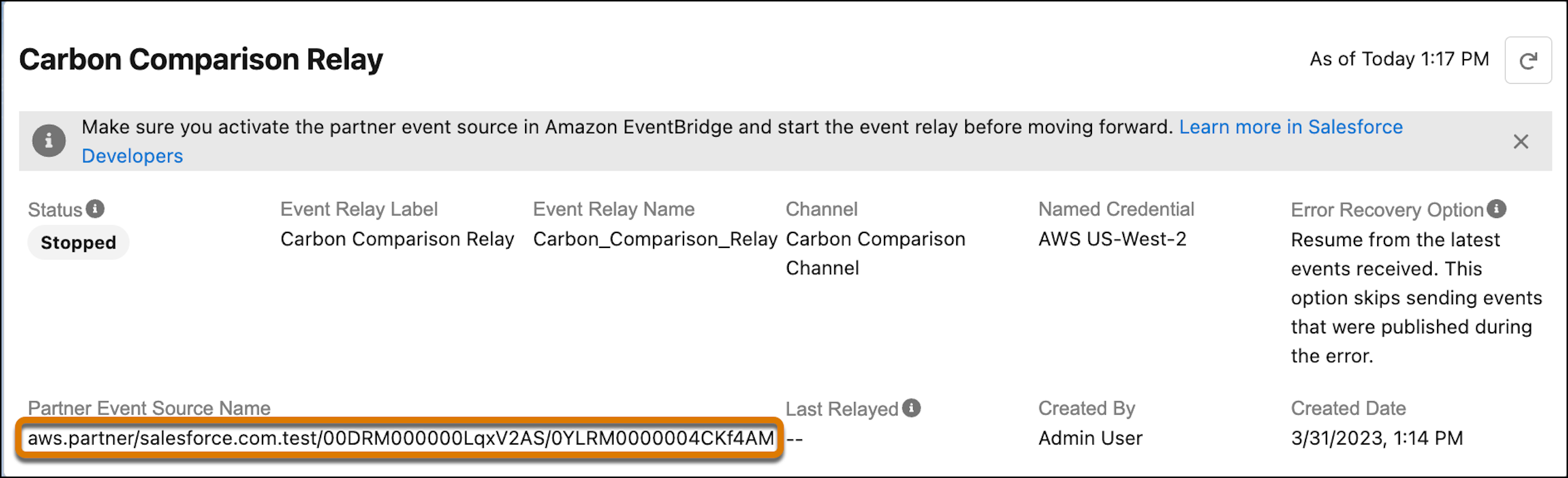
Get the partner event source name from the event relay. In the Event Relays
page, click the event relay. Copy the Partner Event Source
Name field value.
There can be a small delay before this field value is displayed after you
create the event relay. Refresh the page until you get the partner event source
name.
-
Log in to the AWS console. Navigate to https://aws.amazon.com and sign in using your
AWS account credentials.
-
In the search box, enter Amazon EventBridge, and then
from Services, select Amazon EventBridge.
-
In Amazon Eventbridge, under Integration, select Partner event
sources.
-
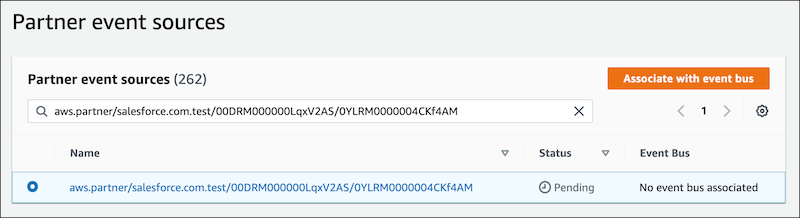
In the search box, enter the name of your event source, the Partner
Event Source Name field value that you copied earlier.
-
Select your event source, and click Associate with event
bus.
-
Click Associate. The status of the event source changes
to Active.