
Qualifier Example for One-to-Many and Many-to-Many Relationships in Amazon DynamoDB
An enterprise stores and retains fine-grain transaction details for millions of customers, resulting in data volumes reaching billions of records. In this example, Salesforce is the system of record for core customer information and details of all the customer’s orders are stored in Amazon DynamoDB for scale reasons.
In this typical relational model, customers are stored in Salesforce as Accounts. Orders, order items, and products are stored in Amazon DynamoDB and virtualized in Salesforce as external objects. Deploying such a solution provides the enterprise’s sellers and customer service agents complete access to customers' order history.
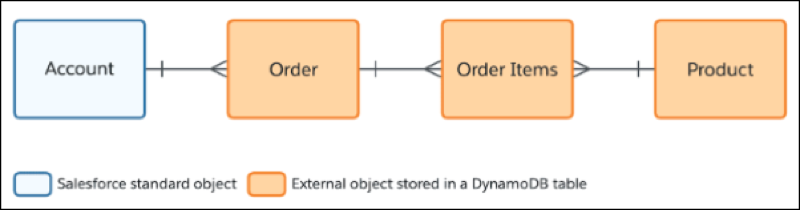
Because Amazon DynamoDB is a NoSQL database and doesn’t support JOIN queries, recommended design practice is to store all related information for a business operation in a single DynamoDB table. To differentiate items that are products and not orders or order items, you have to use other strategies. Another design practice is to identify access patterns and ensure that common operations can be performed with a single query, thereby maintaining high performance even with very large tables. The following is a sample table based on the recommended design practices.
| PK | SK | CUSTOMER | ORDERDATE | TOTAL | SHIPPING | QTY | PRICE | SUBTOTAL | NAME |
|---|---|---|---|---|---|---|---|---|---|
| 1012 | ORDER | A123 | 2022-07-12T14:33:14Z | 25.75 | 5.75 | ||||
| 1012 | product#1 | 2 | 5.00 | 10.00 | Widget X | ||||
| 1012 | product#2 | 1 | 15.00 | 15.00 | Widget Y | ||||
| 1 | PRODUCT | 5.00 | Widget X | ||||||
| 2 | PRODUCT | 15.00 | Widget Y | ||||||
| 3 | PRODUCT | 20.00 | Widget Z | ||||||
| 1013 | ORDER | B456 | 2022-07-15T18:05:45Z | 9.25 | |||||
| 1013 | product#1 | 49.25 | 1 | 5.00 | 5.00 | Widget X | |||
| 1013 | product#2 | 1 | 15.00 | 15.00 | Widget Y | ||||
| 1013 | product#3 | 1 | 20.00 | 20.00 | Widget Z |
Amazon DynamoDB manages one-to-many relationship between orders and order items based on the Adjacency list design pattern. This pattern allows an order and all its order items to be retrieved via a single query. For example, an order management application deployed on AWS executes the following one query and renders a single receipt for an order. For this purpose, the name of the product is duplicated into the order item at checkout. The goal of the table design isn’t to fully normalize data as in relational database design.
SELECT * FROM "OrderManagement" WHERE "pk" =
                "1012"
With the structure of the Amazon DynamoDB table known, we can create qualifiers in Salesforce so that the Salesforce Connect adapter for DynamoDB can separate products, orders, and order items. Along with the other elements of the qualifier, the sort key (SK) is used to differentiate between the items (similar to Record Types). For products and orders, the sort key contains a static value of PRODUCT or ORDER as the differentiator. Because of the static value, certain operations are simplified.

Manage Qualifiers for Order
The partition key (PK) of an order is numeric, but it’s more flexible for the field to be a string relative to Amazon DynamoDB. Hence, the qualifier for Order looks for numeric values via regex even though the attribute type is still a string. The following is a JSON snippet for an Order qualifier.
{
  "tableName": "OrderManagement",
  "columns": {
    "pk": {
      "postFilter": "^[0-9]+$", // regex matching integers
      "type": "S" // attribute must be a String
    },
    "sk": {
      "values": [
        {
          "definition": ""ORDER"" // // matches the static value "ORDER"
        }
      ]
    }
  }
}
While it’s beneficial to map the partition key (PK) field to an Order Number (or a similar field) in Salesforce, the sort key (SK) doesn’t need to be mapped to a field on the Order object. It doesn’t provide any business value to end users.
Manage Qualifiers for Product
Based on the same approach as for Order, the following is a JSON snippet for a Product qualifier.
{
  "tableName": "OrderManagement",
  "columns": {
    "pk": {
      "postFilter": "^[0-9]+$", // regex matching integers
      "type": "S" // attribute must be a String
    },
    "sk": {
      "values": [
        {
          "definition": ""PRODUCT"" // // matches the static value "PRODUCT"
        }
      ]
    }
  }
}
Both Product and Order have other attributes in the Amazon DynamoDB table that must be mapped to external objects fields. Because these attributes don’t need any qualification or translation, they don’t need to appear in the qualifier. Salesforce Connect adapter for Amazon DynamoDB maps these other attributes to field types. For example:
- ORDERDATE string attribute is converted to DateTime field type, if it’s in ISO 8601 format.
- PRICE and TOTAL number attributes are converted to Currency type configured for the Salesforce org.
Manage Qualifiers for Order Items
Qualifiers allow you to use Salesforce formulas to create virtual attributes that don’t physically exist in Amazon DynamoDB. Such attributes can be referenced as external column names when you define the fields on the external object.
The sort key (SK) for Order Items contains an identifier for the product, as well as a static prefix product# to clearly identify that the value refers to a product.
The approach used in this example combines PK and SK in a way that works well relative to Amazon DynamoDB. The partition key and sort key together form a unique composite key for an item. When the following qualifier is applied, the external ID in Salesforce for a particular Order Item takes the form of 1012-1 (PK and SK separated by a hyphen). The external ID is mapped to a Salesforce ID to enable the Salesforce Platform capabilities available to external objects.
The following is a JSON snippet for the qualifier that leverages the approach described and uses a formula to remove the prefix and increase readability.
{
  "tableName": "OrderManagement",
    "columns": {
    "pk": {
      "postFilter": "^[0-9]+$", // regex matching integers
      "type": "S" // attribute must be a String
    },
    "sk": {
      "filter": "products#%" // prefixed with "products#"
    },
    "productCode": {
      "virtual": true, // productCode does not exist in DynamoDB
      "values": [
        {
          "definition": "RIGHT(sk, LEN(sk) - FIND("#", sk))" // Formula parses out the prefix
        }
      ]
    }
  }
}
When you create an external lookup to Product from Order Item, use the virtual
attribute productCode as the external column
name. The external lookup to Order uses the PK as the external column name and using
this column you can create many-to-many relationships.