
The Dynamic Forms Field Section component and the Field components that go inside were previously only available on desktop. To support mobile users, the Record Detail - Mobile component gives your mobile users a way to see the record details on their mobile devices on a Dynamic Forms-enabled page.
Required Editions
| Lightning App Builder available in: Salesforce Classic (not available in all orgs) and Lightning Experience |
| Lightning pages and Dynamic Forms available in: Lightning Experience and the Salesforce mobile app |
|
Available in: Group Essentials, Professional, Enterprise, Performance, Unlimited, and Developer Editions |

When you migrate a record page that supports both desktop and phone to Dynamic Forms, a Record Detail - Mobile component is added to the page for you.
But when you create a fresh page using a template that supports both desktop and phone, after adding the fields and field sections, you must add the Record Detail - Mobile component to the page yourself.
The Record Detail - Mobile component wraps fields from the Record Detail component into a mobile-only container. So, on pages that support both desktop and phone, your desktop users see the Field Section components, and your mobile users see the Record Detail - Mobile component.

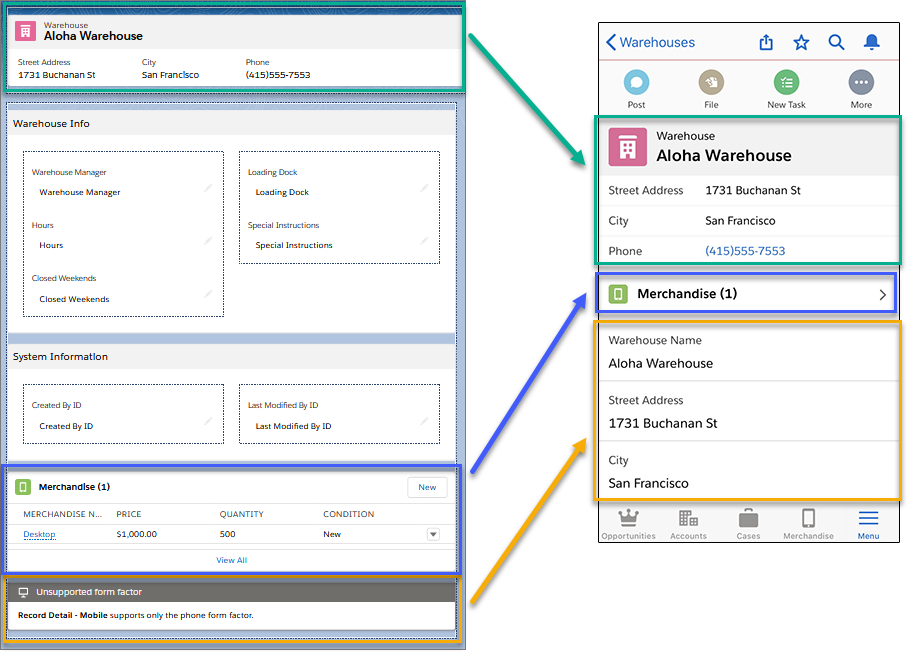
The Record Detail - Mobile component displays with an “Unsupported form factor” message when viewed on a page in the Lightning App Builder in Desktop preview mode.