
To determine the recommended domain configuration option to serve your custom domain, answer a few questions about your domain and your Salesforce configuration.
Required Editions
| Available in: both Salesforce Classic and Lightning Experience |
| Available in: Enterprise, Performance, and Unlimited Editions. |
| Applies to: Salesforce Sites and LWR, Aura, and Visualforce sites |
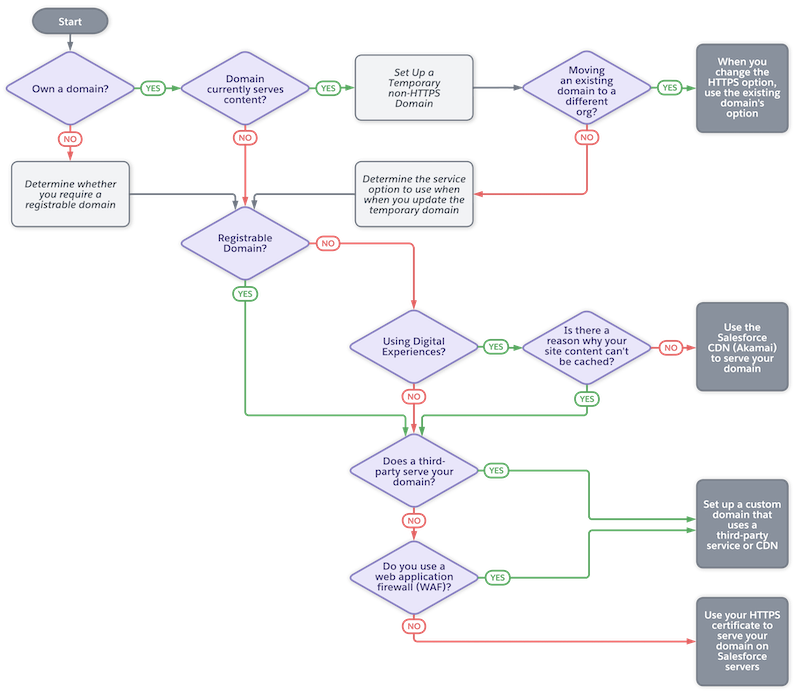
- If you don’t own a domain yet, determine the domain to use to serve your site content, including whether you require a registrable domain. For more information, see Custom Domain Prerequisites.
-
If your domain currently serves content, to minimize the downtime for your
domain, plan to set up a temporary non-HTTPS
domain.
- To move a domain to another org, set up a temporary non-HTTP domain as the first step. After the domain is configured in your new org, use the same domain configuration option as the existing domain. For more information, see Move a Domain to Another Production Org.
- If your domain serves content outside of Salesforce, to determine the final option to use for your domain, go to the next step.
- If you plan to use a registrable domain, skip to the question about whether a non-Salesforce third-party service or CDN serves your domain.
-
If you have digital experiences, including the ones built with Experience Cloud, Commerce, and Industries licenses, we recommend that you use the
Salesforce content delivery network (CDN).
- If your company’s policies prohibit the caching of your site content, go to the question about whether a non-Salesforce third-party service or CDN serves your domain.
- Otherwise, when you add your domain in Salesforce, select the domain configuration option Serve the domain with the Salesforce Content Delivery Network (CDN). For instructions, see Serve Your Experience Cloud Site with the Salesforce Content Delivery Network (CDN).
To learn how CDNs optimize page load times and site performance by caching your site content, see Content Delivery Networks (CDNs) and Salesforce. - If a non-Salesforce third-party service or CDN serves your domain, when you add your domain in Salesforce, select the domain configuration option Use a third-party service or CDN to serve the domain. For instructions, see Use a Third-Party Service or CDN to Serve Your Custom Domain.
- If your domain uses a web application firewall (WAF), when you add your domain in Salesforce, select the domain configuration option Use a third-party service or CDN to serve the domain. For instructions, see Use a Third-Party Service or CDN to Serve Your Custom Domain.
- If none of the other scenarios apply, when you add your domain in Salesforce, select the domain configuration option Serve the domain with your HTTPS certificate on Salesforce servers. For instructions, see Serve a Custom Domain with Your HTTPS Certificate on Salesforce Servers.
For more information about each of these options and the corresponding traffic flows, see Options to Serve a Custom Domain.