Create a quality gate rule based on your testing goals. We recommend establishing
criteria that are realistic yet strict enough to maintain quality.
Required Editions
| Available in: Lightning Experience |
| Available in: Enterprise, Performance, Professional (API access
required), Unlimited, and Developer Editions |
| User Permissions Needed |
| To create quality gate rules: |
DevOps Testing Manager |
| To edit quality gate rules: |
DevOps Testing Manager |
-
From the Quality Gate Rules tab, click New.
-
Enter a name and description for the quality gate rule.
-
Click Next.
-
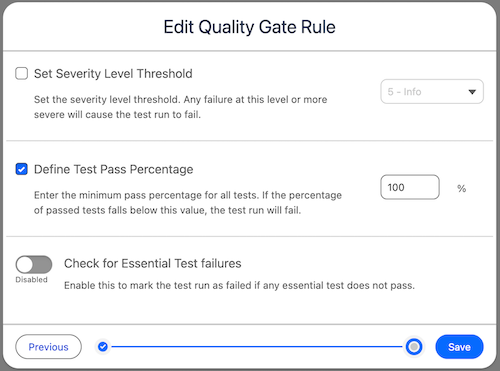
On the Criteria page, select the criteria that you want to set for the quality gate
rule:
- Severity level threshold– The quality gate rule fails if a test with a severity level
equal to or higher than the threshold level fails.
- Test pass percentage– The quality gate rule fails if the test pass percentage is less
than this value.
- Essential test failures– The quality gate rule fails if an essential test
fails.
-
Save your changes.
View the details of the created quality gate rule in the Quality Gate Rules
tab.
-
To edit a quality gate rule:
-
Go to the Quality Gate Rules tab, and select the quality gate rule you want to
edit.
-
Click Edit.