
Manually trigger a test run for a review event when automated testing has failed or when you need to verify test results before attempting a promotion.
Required Editions
| Available in: Lightning Experience in Professional (API access required), Enterprise, Performance, Unlimited, and Developer Editions |
| Not Available in: Government Cloud Plus. Contact your Salesforce account executive for more details. |
| Not available in: EU Operating Zone. EU Operating zone is a special paid offering that provides an enhanced level of data residency commitment. Lifecycle Center is supported in orgs in the EU that aren't part of EU OZ, per standard product terms and conditions. |
| User Permissions Needed | |
|---|---|
| To run on-demand testing for review events: | Lifecycle Center Testing Manager OR Lifecycle Center User OR Lifecycle Center Deployment Manager |
Before you begin, make sure that:
- The work item is in In Review status.
- Test suites are assigned to the Development stage. See Add Test Suites to a Stage.
If automated testing doesn't start or fails during a Review Event, you can run tests manually to validate your work item before the promotion process begins. Manual test execution gives developers a way to meet quality gate requirements and unblock a work item without waiting for the next automated trigger.
Run tests manually for a Review Event in these situations:
- Automated testing didn't start due to a system or configuration error.
- The test run completed but failed, and you've resolved the underlying issue and want to rerun without committing new code.
- You need to validate a work item that is currently in In Review status before it can move forward.
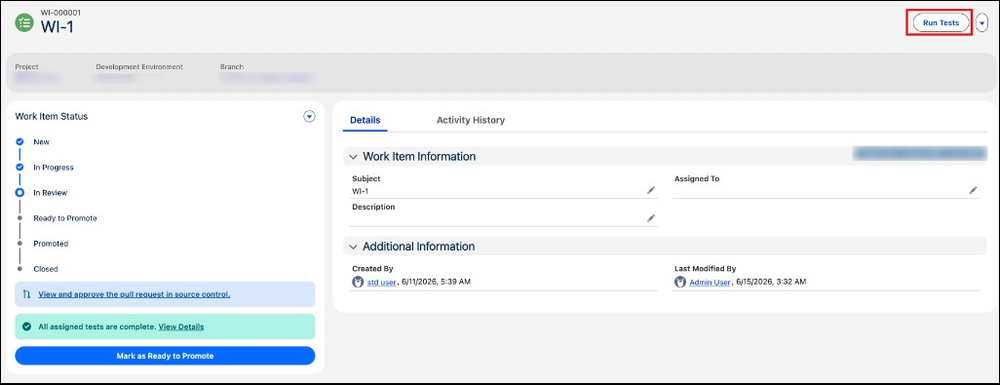
- From the Lifecycle Center navigation menu, select the Work Items tab.
- Click the work item that is currently in In Review status.
- In the work item view, click Run Tests to execute the assigned test suites.

Note Manual test execution runs the same test suites assigned to the Development stage as
the automated Review Event. Resolving quality gate failures before promotion keeps your
pipeline moving without compromising your release standards.