
If a Pre-Promotion Event fails, on-demand testing lets you manually verify whether tests are now passing. A new automated execution runs when the promotion is attempted again. This is most commonly used when a promotion is blocked by a failed quality gate and you need to re-trigger testing after resolving the underlying issue.
Required Editions
| Available in: Lightning Experience in Professional (API access required), Enterprise, Performance, Unlimited, and Developer Editions |
| Not Available in: Government Cloud Plus. Contact your Salesforce account executive for more details. |
| Not available in: EU Operating Zone. EU Operating zone is a special paid offering that provides an enhanced level of data residency commitment. Lifecycle Center is supported in orgs in the EU that aren't part of EU OZ, per standard product terms and conditions. |
| User Permissions Needed | |
|---|---|
| To run on-demand testing for pre-promotion events: | Lifecycle Center Testing Manager OR Lifecycle Center User OR Lifecycle Center Deployment Manager |
Before you begin, make sure that the test suites are assigned to the destination stage. See Add Test Suites to a Stage.
- From the Lifecycle Center navigation menu, select the Pipelines tab.
- Locate the pipeline stage — such as Integration or Staging — that contains the work items.
-
Trigger test execution based on your situation.
- For a first run or manual run, click Run Test associated with the promotion in the stage card.
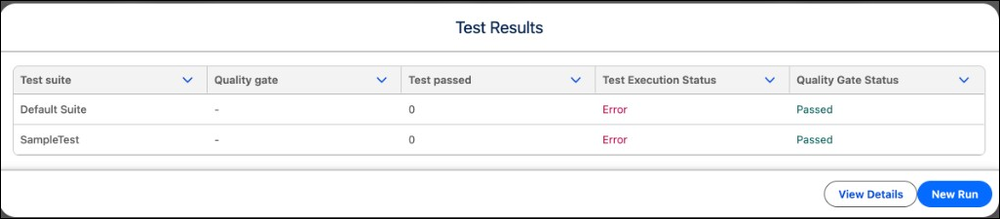
- After a failed pre-promotion event, click Test Results in the action menu of the stage card. Click New Run.
Once the test run completes, review the results. If all quality gate criteria are met, proceed with the promotion. If tests fail again, review the failure details and resolve the issues before rerunning.

Note Each pipeline stage — Integration, Staging, and Production — can have different test suites
and quality gate rules assigned. Make sure that the correct suites are assigned to the target
stage before running tests manually. See Add Test Suites to a
Stage.