
When you configure a test provider, Lifecycle Center Testing automatically syncs your tests and test suites into the Lifecycle Center pipeline stages.
Required Editions
| Available in: Lightning Experience in Professional (API access required), Enterprise, Performance, Unlimited, and Developer Editions |
| Not Available in: Government Cloud Plus. Contact your Salesforce account executive for more details. |
| Not available in: EU Operating Zone. EU Operating zone is a special paid offering that provides an enhanced level of data residency commitment. Lifecycle Center is supported in orgs in the EU that aren't part of EU OZ, per standard product terms and conditions. |
| User Permissions Needed | |
|---|---|
| To configure a test provider: | Lifecycle Center Testing Manager |
If your team already uses a third-party testing solution, you can bring it directly into Lifecycle Center Testing. Reach out to your test provider to enroll their solution with Salesforce Lifecycle Center Testing and make it available as a configurable test provider in your pipeline. To use a third-party test provider, make sure that the solution package is available in your org.

Note Before syncing, make sure these requirements are met:
- To sync Salesforce Code Analyzer v5.0: You must be connected to GitHub and have access to the pipeline repository.
- To sync Apex or Flow test providers: You must be authenticated to all environments in the pipeline.
- From the Pipelines tab, click Tests.
- Click Configure Test Provider.
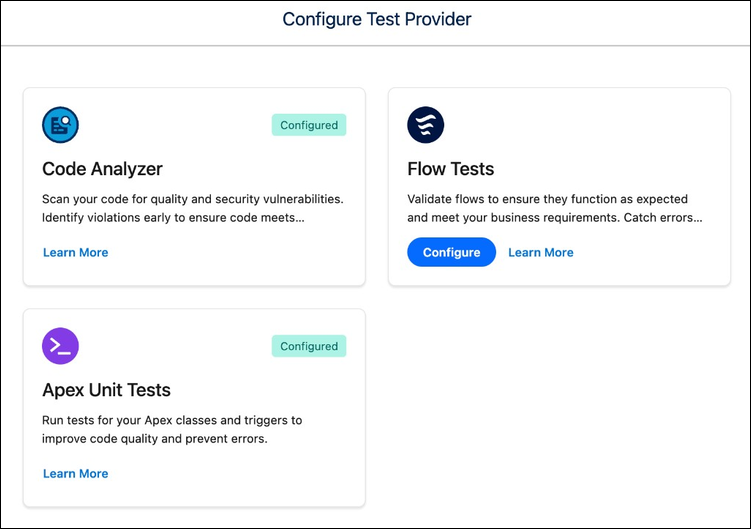
- In the Configure Test Provider window, select the test provider for your org.
- On the provider's card, click Configure.
- Follow the on-screen prompts to complete the provider configuration.
- To update the pipeline after adding more test suites to your provider, click Sync Test Provider.
Note After configuration, test suites from the provider are automatically synced and
available for assignment to pipeline stages. If new test suites are added later in the
provider tool, use Sync Test Providers to pull in the latest
updates.