
Each pipeline stage in Lifecycle Center has an associated branch in your source control repository that contains the changes for your team's work items. When you build your pipeline, let Lifecycle Center create a branch for a stage, or specify an existing branch in the repository.
Required Editions
| Available in: Lightning Experience in Professional (API access required), Enterprise, Performance, Unlimited, and Developer Editions |
| Not available in: Government Cloud Plus. Contact your Salesforce account executive for more details. |
| Not available in: EU Operating Zone. EU Operating zone is a special paid offering that provides an enhanced level of data residency commitment. Lifecycle Center is supported in orgs in the EU that aren’t part of EU OZ, per standard product terms and conditions. |
| User Permissions Needed | |
|---|---|
| To specify a branch for a pipeline stage: | Lifecycle Center Admin |
If you let Lifecycle Center create the branch, provide a unique alphanumeric name. We recommend that branch names use:
- All lowercase letters
- 60 characters or fewer
- Hyphens or underscores as separators (no spaces)
- Both letters and numbers, but not all numbers

A branch must be sourced from the next stage's branch (right to left). For example, if your
release environment's branch is main, then the branch for the pipeline stage to
the left of it, Staging, must be created from main. The branch for the pipeline
stage to the left of Staging, UAT, must be created from staging. Lifecycle Center
handles this sourcing for you when it creates the branch.
- Go to the Pipelines tab, and select your pipeline.
-
Locate the pipeline stage, and click Specify Branch.
-
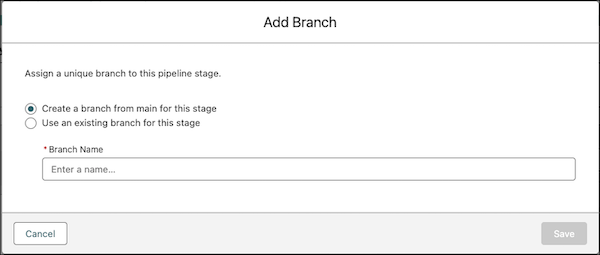
From the Add Branch window, assign a unique branch to the pipeline stage.
- To let Lifecycle Center create a branch, select Create a branch from main for this stage, and enter a unique name in Branch Name.
- To use a branch that already exists in your repository, select Use an existing branch for this stage, and enter the branch name in Branch Name.
-
Save your changes.
The branch is assigned to the pipeline stage.