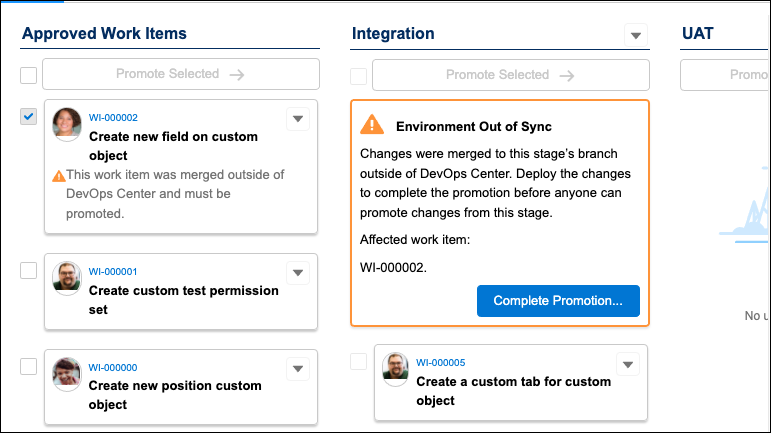
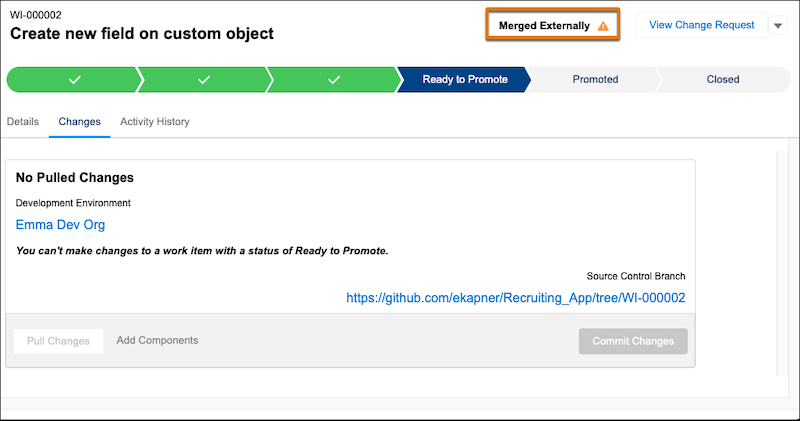
If you merge the change request in the source control system, the changes are in a partially promoted state because they’ve been merged but not yet deployed to the associated pipeline environment. You can complete the promotion in DevOps Center or use Salesforce CLI.

Note See External Change Requests and Merges for tips about creating the change request and merging the
changes directly in the source control system.
To keep everything in sync, whether you merged changes for a work item or changes in a downstream pipeline branch, you must finish the promotion before any more changes can be promoted to or from the stage.
- To complete the promotion using Salesforce CLI, see Deploy Changes Using Salesforce CLI (Beta).
- To complete the promotion in DevOps Center, go to Pipeline Stages and follow these steps.

Important If you’re working directly in GitHub, delays can occur between when these
actions happen and when they’re reflected in DevOps Center. If you take subsequent actions on
the related objects in DevOps Center before they’re reflected, you're likely to see unexpected
or inconsistent behavior. For metadata changes, we recommend that you wait for delayed events to
be reflected in DevOps Center. For non-metadata changes, such as updates to the
.forceignore file, you can continue with the promotion.
- In DevOps Center, click Pipeline.
- In the Pipeline Stages tab, click Complete Promotion.