
When you promote work item bundles, all unpromoted versioned bundles are promoted together to the next stage. The unpromoted work item bundles and corresponding work items are listed in this stage.
- In the Pipeline view, in a versioned stage, click Promote Work Item
Bundle(s).
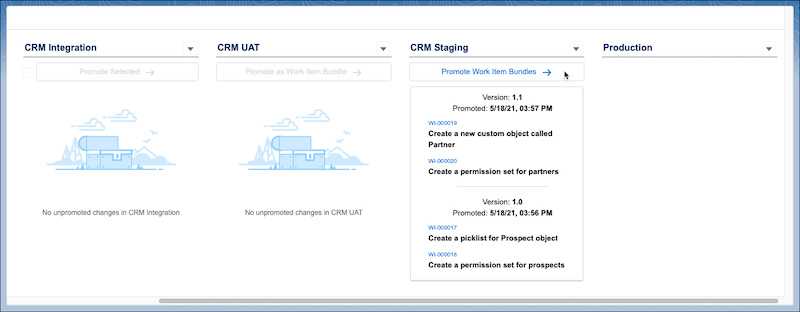
- If you haven’t logged in to the environment for the next pipeline stage from within DevOps Center, complete the login process, then click Promote Work Item Bundle(s).
- Select Promote Now, the changes to promote, and which Apex tests to
run.
To perform a validate-only deployment, see Run a Validate-Only Deployment.
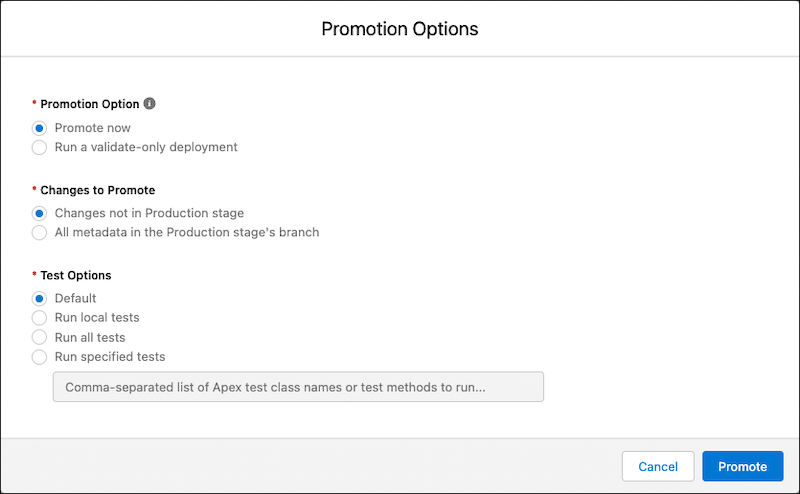
- Click Promote.
Each versioned work item bundle is merged and deployed to the environment associated with the next stage. Only the latest work item bundle version is displayed, but all earlier work item bundles are also present in the stage.