
When you specified the release target (production) environment, it automatically became
the last pipeline stage. DevOps Center also associates it with the default branch in the source
control repository, which is often called main by default. We
don’t recommend that you edit the branch for this final pipeline stage.

- From the Pipeline page, start with the Staging stage.
-
Enter the Stage Name.
Stage names can’t contain backslashes or double quotes.
- Click Connect Environment to log into the environment associated with this stage.
-
Next, click Specify Branch to indicate the branch associated
with this stage.
You can create a branch for this stage, or select an existing one. If you’re using the same source control repository as another DevOps Center project, branches must be unique for each pipeline stage, except for the release branch (often called main). Select an existing branch only if it isn’t being used in another DevOps Center project. DevOps Center can’t track changes across projects so unique branches ensure that conflicts don’t get introduced and changes don’t get overwritten.
The Branch Settings dialog can display a maximum of 500 branches. If you don’t see the branch you want to select in the dropdown, delete any obsolete branches in the source control repository and try again.
When you promote changes to this stage, the changes are merged to this branch, and DevOps Center knows exactly what to deploy to the associated pipeline environment.
-
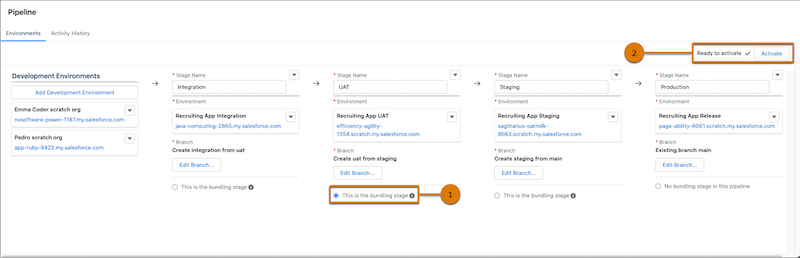
Indicate which stage is the bundling stage, the stage where changes are grouped,
versioned, and promoted together in downstream stages (1).
In the template, the UAT stage is the bundling stage. The items you promote from integration are released together in a work item bundle in the next stage, UAT, and for all future stages.
See To Bundle or Not to Bundle, That’s a Great Question for why we recommend a bundling stage.
- Repeat this process for the rest of the stages.
- Activate the Pipeline (2).
To improve release quality, we recommend you set up and use DevOps Testing.