
Lifecycle Center uses Agentforce to streamline conflict resolution for both low-code admins and developers. By integrating with Agentforce Vibes, Lifecycle Center provides AI-assisted guidance whether you work in the UI or the IDE.
Required Editions
| Available in: Lightning Experience in Professional (API access required), Enterprise, Performance, Unlimited, and Developer Editions |
| Not Available in: Government Cloud Plus. Contact your Salesforce account executive for more details. |
| Not available in: EU Operating Zone. EU Operating zone is a special paid offering that provides an enhanced level of data residency commitment. Lifecycle Center is supported in orgs in the EU that aren’t part of EU OZ, per standard product terms and conditions. |
Resolve Conflicts from the UI (Low-Code)
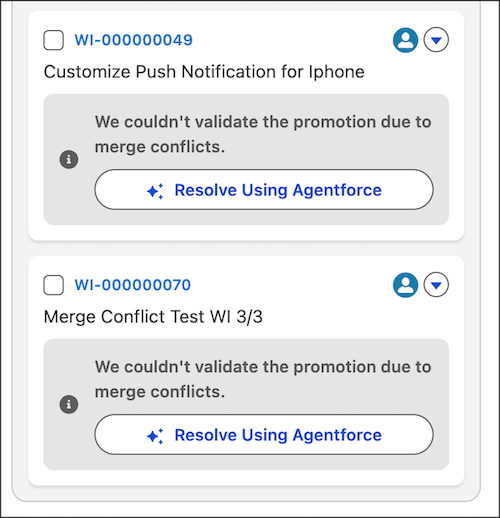
If you're a low-code developer or admin, use Lifecycle Center MCP tools to manage conflicts without writing commands. When Lifecycle Center detects a conflict during a promotion, the pipeline highlights the specific blocked work item with an error notification.
Click the Resolve with Agentforce button to automatically launch Agentforce Vibes IDE. Lifecycle Center preloads the specific error message and context into the prompt. You can interact with Agentforce to review the conflicting files and accept the recommended fixes.
Resolve Conflicts Using Lifecycle Center MCP Tools
Use Lifecycle Center MCP tools to detect, analyze, and resolve conflicts programmatically. When working within Agentforce Vibes IDE, Agentforce automatically detects the merge conflict. It adds the error details to the prompt. Ask Agentforce Vibes to explain the differences between the files or suggest a solution.