
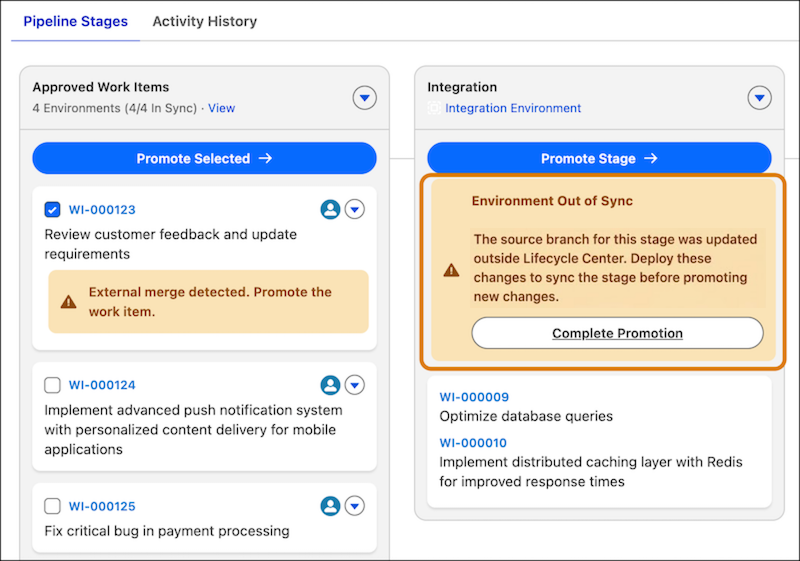
Lifecycle Center detects external changes that you merge directly into a stage’s source control branch.
Required Editions
| Available in: Lightning Experience in Professional (API access required), Enterprise, Performance, Unlimited, and Developer Editions |
| Not Available in: Government Cloud Plus. Contact your Salesforce account executive for more details. |
| Not available in: EU Operating Zone. EU Operating zone is a special paid offering that provides an enhanced level of data residency commitment. Lifecycle Center is supported in orgs in the EU that aren’t part of EU OZ, per standard product terms and conditions. |
Follow these best practices when working outside of Lifecycle Center:
- Use the Squash and merge option when merging changes directly into the source control repository. This option combines all commits into a single commit, which simplifies the history log and makes it easier to audit changes.
- If there are any merge conflicts during the external merge, resolve them by using Agentforce or the source control provider's UI. Then, complete the deployment in Lifecycle Center.
- If you work directly in the source control, there can be a delay before those actions appear in Lifecycle Center. If you take additional actions on related objects in Lifecycle Center before the updates appear, you may see unexpected or inconsistent behavior.
- For metadata changes, wait until delayed events are reflected in Lifecycle Center. For non-metadata changes, such as updates to the .forceignore file, you can continue with promotion.
For details about merge types and tips for creating change requests and merges directly in the source control system, see External Change Requests and Merges.

Note We don't recommend using external merges frequently. Use Lifecycle Center UI for your DevOps
tasks, such as promotion.
An external merge updates the stage branch but doesn’t deploy the changes to the environment associated with that stage. Lifecycle Center marks the stage as out of sync until you deploy the changes. See Complete a Promotion After an External Merge.
- Complete a Promotion After an External Merge
Deploy changes that were merged in source control to the stage org so the pipeline is in sync.