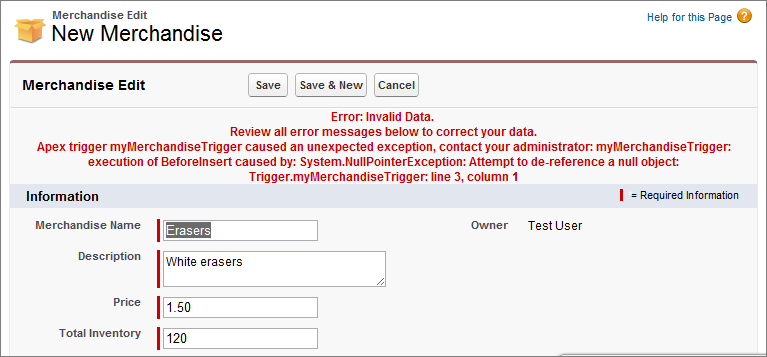
When an exception occurs, code execution halts. Any DML operations that were processed before the exception are rolled back and aren’t committed to the database. Exceptions get logged in debug logs. For unhandled exceptions, which are exceptions that the code doesn’t catch, Salesforce sends an email that includes the exception information. The end user sees an error message in the Salesforce user interface.
Required Editions
| Available in: both Salesforce Classic (not available in all orgs) and Lightning Experience |
| Available in: Performance, Unlimited, Developer, Enterprise, and Database.com Editions |
| User Permissions Needed | |
|---|---|
| To access the Apex Exception Email Setup page | View Setup |
| To write Apex code | Author Apex |
| To use Tooling API | API Enabled |

Unhandled Exception Emails
When unhandled Apex exceptions occur, emails are sent that include the Apex stack trace, exception message, customer’s org and user ID, org and user name, and My Domain name. No other data is returned with the report. Unhandled exception emails are sent by default to the developer specified in the LastModifiedBy field on the failing class or trigger. In addition, you can have emails sent to users of your Salesforce org and to arbitrary email addresses. These email recipients can also receive process or flow error emails. To set up these email notifications, from Setup, enter Apex Exception Email in the Quick Find box, then select Apex Exception Email. The entered email addresses then apply to all managed packages in the customer's org. You can also configure Apex exception emails using Tooling API object ApexEmailNotification.
For more information about unhandled exception emails, see Unhandled Exception Emails
Unhandled Exceptions in the User Interface
If an end user runs into an exception that occurred in Apex code while using the standard user interface, an error message appears. The error message includes text similar to the notification shown here.