Formula fields in Salesforce are read-only, so Own Data Platform captures the formula's logic as part of the metadata backup. And then, restoring or replicating records automatically recreates the formula's result upon data insertion.
The Own Data Platform application excludes the value (the result) of the formula fields in the data backup, and instead captures the "how-to" as a separate item within the Metadata backup.
When restoring or replicating the object’s records which have formula fields, the metadata responsible for the calculation will recreate the result automatically upon insert. You can restore these metadata XMLs with a third party IDE tool (such as Workbench).

Sometimes you may need to access the actual formula from the metadata backup for various reasons such as comparing an older calculation to a recent change or simply for audit purposes.
To access it, simply navigate to the Metadata backup history, select ‘CustomObject’ , and then download the zip file.
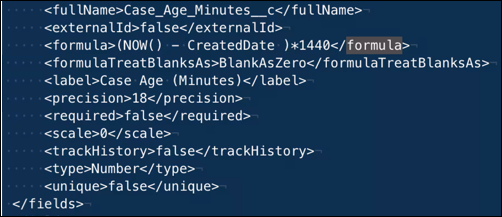
Within each object, you will find the formula field calculation in the XML.
In this example, we show a formula calculated on a field in the Case object to determine Case age.