Salesforce Automation Bypass temporarily disables automations, such as validation rules and flows. Use custom checkboxes on the User object, and then add conditions to the automations to verify the checkbox state. Set the checkbox to true to bypass the automation for that user. This gives you more control when you restore Salesforce data, without impacting other users.
Creating the Checkbox Fields
In these examples, we create checkbox fields for the User object covering different automations.
These are the API names of these checkbox fields in the examples.
- Flows and Apex triggers:
AllowAutomationBypass__c - Duplicate rules:
AllowDuplicateRuleBypass__c - Validation rules and lookup filters:
AllowValidationRuleBypass__c
These fields are unselected by default and need to be actively selected. When the field is selected (=true), a validation rule, flow, apex trigger, or duplicate rule’s condition should become false, which bypasses the automation’s logic.
We recommend making the fields Read + Write only in permission sets assigned to the Salesforce admin.
Bypassing Validation Rules
To bypass a validation rule, add a condition that checks the status of the checkbox field you created. Validation rules block automations when they return a true value. Add a condition that returns false when the bypass checkbox field is selected.

This example bypasses a validation rule that blocks saving a Lead as “Qualified” if its Phone field is empty.
And(
                           ISPICKVAL(Status, “Qualified”),
                           ISBLANK(Phone)
)
Add a condition to this rule that returns false when the bypass checkbox field is selected.
And(
                           ISPICKVAL(Status, “Qualified”),
                           ISBLANK(Phone)
                           NOT($User.AllowValidationRuleBypass__c)
)
Bypassing Record-Triggered Flows
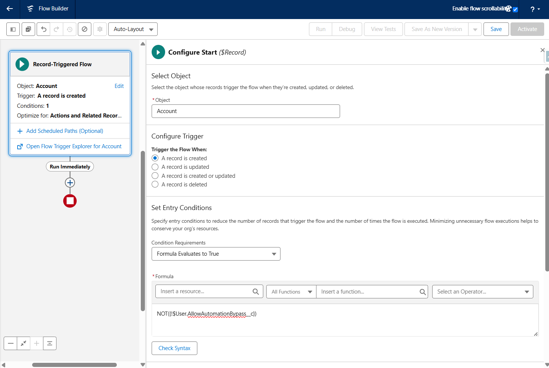
To bypass a record triggered flow, add a formula entry condition that checks the status of the checkbox field you created. A flow will not run if the entry condition is not met (=false). Fields of the user who triggered the record-triggered flow can only be referenced by a formula. Use a formula entry criteria to check the bypass checkbox.
This example bypasses a record-triggered
flow. By including NOT($User.AllowAutomationBypass__c) in the formula, it will
be false if the bypass checkbox is enabled, bypassing the flow.
Bypassing Apex Triggers
To bypass an Apex trigger, nest the trigger logic under a condition that checks if the bypass checkbox is false. The code will only continue to the nested trigger logic if the bypass checkbox is unselected and skips it if the checkbox is selected.
This example bypasses an Apex trigger. The API name
of the bypass checkbox
isAllowAutomationBypass__c.
// Proof of concept trigger for automation bypass
trigger AccountTrigger on Account (before insert) {
                           // If running user doesn't have AllowAutomationBypass__c set to true
                           if (![SELECT AllowAutomationBypass__c FROM User WHERE Id =: UserInfo.getUserId()].AllowAutomationBypass__c){
                                            // We execute the trigger logic
                                            // <write your code / reference to execution class handler here>
                          }

}
Bypassing Duplicate Rules
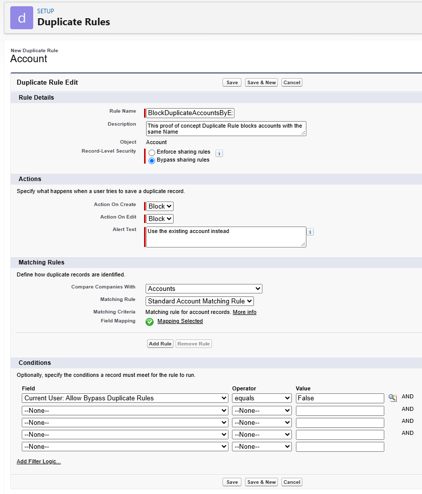
To bypass a duplicate rule, add a condition where the bypass checkbox equals false. Duplicate rules are rules created to detect when object records with the same data are created, as long as all their conditions are met. If the checkbox is selected, the condition isn’t met and the duplicate rule doesn’t trigger.
This example bypasses a duplicate rule with a condition. With this condition, if the bypass checkbox is selected, the condition won’t be met and the duplicate rule won’t trigger.