
Open the Guidance Center to easily access help while in the flow of work.
Required Editions
| Available in: Lightning Experience |
| Available in: Starter, Professional, Enterprise, Performance, Unlimited, and Developer Editions |
The Guidance Center icon appears in the global header when you have Sales Programs (including Partner Tracks and Enablement Lite), Guidance Sets, or Learning Paths. Learning Paths includes company-assigned and suggested learning items. If you have none of these, the icon is hidden. Nothing is removed or turned off. To open the Guidance Center panel, in the global header, click the Guidance Center icon.

The Guidance Center panel includes these sections.
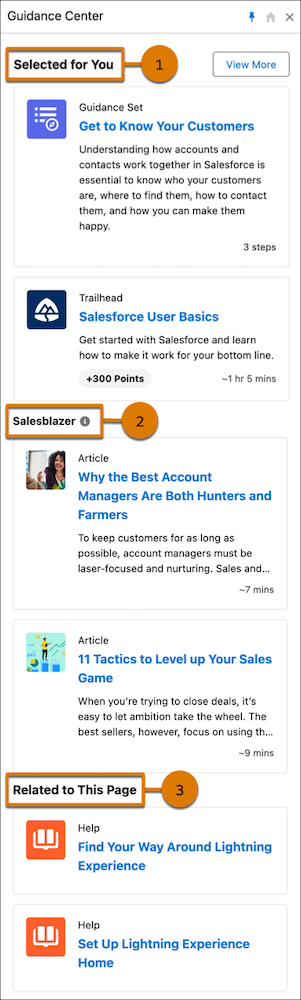
- Selected for You (1)
- Includes suggested content that’s specific to your role. Learning items assigned through Learning Paths also appear here when they have a due date but no specific object or record location. Content is removed from this section when you complete it.
- Salesblazer (2)
- Includes insights, tips, and strategies curated for and written by sales leaders and
professionals, originally published on the Salesforce website. Content in the
Salesblazer section opens in a new browser tab. Clicking an item in the Salesblazer
section opens the content in a new browser tab. Items remain in the Salesblazer section
until the source content is refreshed, which occurs weekly on average.
 Important The Salesblazer section isn't available in Government Cloud Plus environments.
 - Related to This Page (3)
- Includes contextual content that’s specific to the page that you’re currently working on. Learning items assigned through Learning Paths also appear here when they have a specific object or record location. Content remains visible in this section when complete it so you can refer to it again. If there’s no contextual content or assignments for the page, the section is removed.
If your company uses Enablement for sales reps, the Guidance Center also shows a user’s assigned Enablement programs.