
For Create a Record, Update a Record, and Log a Call action types, you can create a custom message that displays when the action executes successfully.
Required Editions
| Available in: both Salesforce Classic and Lightning Experience |
| Available in: Group, Professional, Enterprise, Performance, Unlimited, Contact Manager, Database.com, and Developer Editions |
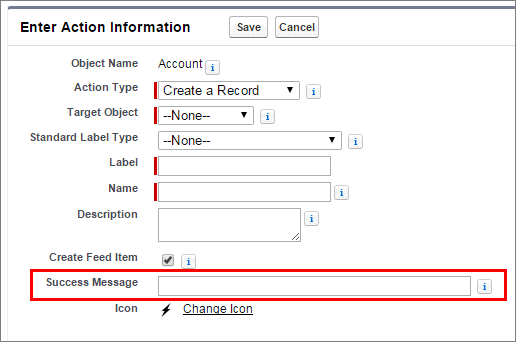
In the Salesforce mobile app and Lightning Experience, when a create, update, or Log a Call action is completed, a default success message displays, regardless of whether the action created a feed item. If you add a custom success message to one of these actions, your custom success message displays instead of the default message.
In Salesforce Classic, custom success messages have slightly different behavior. If you select Create Feed Item for a Create a Record or Log a Call action, no success message displays in Salesforce Classic. The feed item itself is the confirmation that the action executed successfully.
You can configure translations for custom success messages through the Translation Workbench. From Setup, enter Translate in the Quick Find box, and then select Translate. Choose Action for the Setup Component, and choose Informational Message for the Aspect.
