
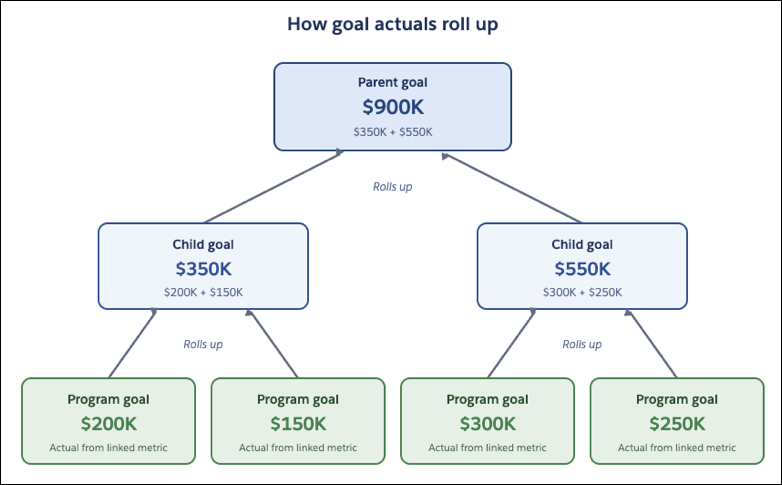
Goal actuals update from the bottom up. When a campaign goal's actual value changes, that change rolls up to its parent goals on its own, keeping the totals current.
Required Editions
| View supported editions |
Refresh Campaign Goal Actuals
When you link a campaign goal to a semantic metric definition, its actuals refresh on their own each day. You don't enter or import anything.
Each refresh pulls only the results that belong to the goal. The metric tracks results by date, and the goal counts only its own campaign's results within the goal's start and end dates. The goal applies its campaign and dates on its own. For example, a webinar campaign goal that runs from January 1 to March 31 counts only that campaign's registrations in those three months.
The refresh runs early each morning in the org's time zone. You can also refresh a goal's value yourself at any time. If a goal can't refresh one day, the rest still update, and each goal keeps its last saved value until the next successful refresh. You get an in-app and email notification each time a goal's value refreshes, whether it refreshes automatically or you refresh it yourself. The notification tells you whether the refresh saved the new value or failed.
Roll up Actuals to Parent Goals
A parent goal's actual comes from the results reported on its child goals. When a campaign goal's actual value changes, that change rolls up to its parent goals on its own. If a goal's actual comes from another source, such as a program goal with a manually entered or imported value, update the parent goal's actual yourself. Parent totals stay current for campaign goals without any extra step.
The rollup adds up each child goal's actual value at that moment, no matter how each value got there. It doesn't change the child values. It just totals those values. You also get an in-app and email notification when a child goal's value rolls up to its parent, whether the rollup succeeds or fails.
When you move a goal to a different parent, both parent goals update on their own. The former parent's total drops the moved goal's contribution, and the new parent's total adds it. Each parent then recalculates from its remaining child goals.
Keep Child Targets Within the Parent Target
As you break down a goal across levels, the child targets can add up to the parent target, but not go over it. These rules also apply to the goal hierarchy:
- Each child goal's dates fall within its parent goal's dates.
- Each child goal matches its parent's type and subtype.
- A goal hierarchy or a program hierarchy can have up to 100 goals.
- A goal can pull actuals from a semantic metric definition only if it has no child goals.