
Learn about the supported media formats, layout options, and interactive elements available for RCS Rich Cards.
Supported Media
| Media Type | Format | Maximum File Size |
|---|---|---|
| Images | .jpeg, .jpg, .png, .gif | 25 MB for CMS upload; 100 MB for external URL |
| Videos | .mp4, .mpeg | 25 MB for CMS upload; 100 MB for external URL |
| Document | 100 MB |
Rich Card Layouts
Select a layout based on how you want your media and text to look.
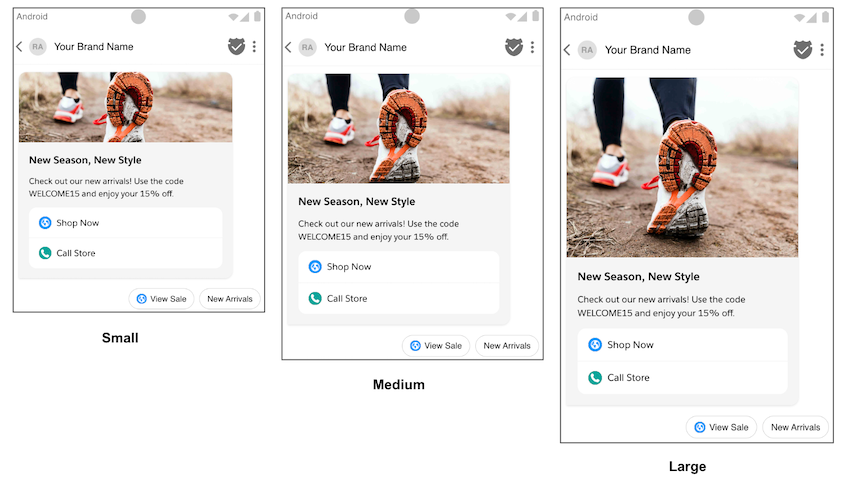
Vertical Layout: The media sits at the top of the card above your text. This layout supports customized media sizing options depending on your aspect ratio and design needs.
- Small: Displays media at a height of 112 DP with a 2:1 aspect ratio.
- Medium: Displays media at a height of 168 DP with a 16:9 aspect ratio.
- Large: Displays media at a height of 264 DP with a 7:3 aspect ratio.
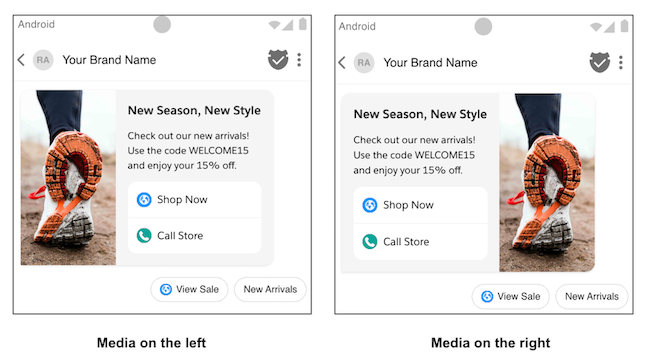
Horizontal Layout: The media is positioned on the left or right side of the card. In this layout, the media has a fixed width of 128 DP, and the card height scales automatically to fit your text.
Suggestions and Buttons
Each rich card supports up to four suggested replies or actions built directly into the card. You can also include up to 11 additional suggestions in a chip list below the card. Text for suggestions and buttons is limited to 25 characters.
Suggestions: Provide predefined text labels that allow users to send a response instantly without typing.
Buttons: Trigger specific actions that users can take, such as opening a URL, dialing a phone number, or a quick reply.