
Enhance data collection without compromising user experience with short forms that are easy to complete. Use hidden fields to gather contextual data behind the scenes, or add default values in visible fields to speed up form completion. Hidden fields and default values are available on the Checkbox, Dropdown, Number, Plain Text, and Text Area input components.
Required Editions
| User Permissions Needed | |
|---|---|
| To create a form: |
Marketing Cloud Manager permission set AND Any CMS workspace contributor role |
| To publish a form: |
Marketing Cloud Manager permission set AND A CMS workspace contributor role of content admin or content manager |
A default value is useful in a visible field when you expect most users to enter the same value. A default value is useful in a hidden field when you want to capture information without requiring users to enter it.
A URL parameter fills its related form field with a
value from the URL parameters of its host page, whether that’s a marketing landing page or an
external site. You can use UTM parameters or any other URL parameter. For example, a URL
parameter in a hidden Source field can collect details about where a particular lead came from.
The UTM parameter utm_source can pull in the value
source=newsletter. The URL parameter product_team can record
the product page where the lead originated.
If you mark a hidden field as required, you must enter a fallback value. With a fallback value, you can gain context even if the form delivers an invalid URL parameter or no value at all. When you enter a fallback value, it appears in the component on the canvas and, for a visible field, in preview mode and the live form.
For example:
- In a hidden Status field, a default value can automatically record a new lead as Open.
- In a visible Country field, a default value is helpful if you expect most leads to enter the same country name.
- To learn which product page a contact form submission came from, you enter the URL parameter
product_teamfor a hidden Lead Source field. For the fallback value, you enter Main Site. If the URL for the form’s page doesn’t include theproduct_teamparameter, you still learn that the lead came from your main site and not from, say, a Google search or email.
-
To hide a field, select Hide this field in the input component’s
property panel.
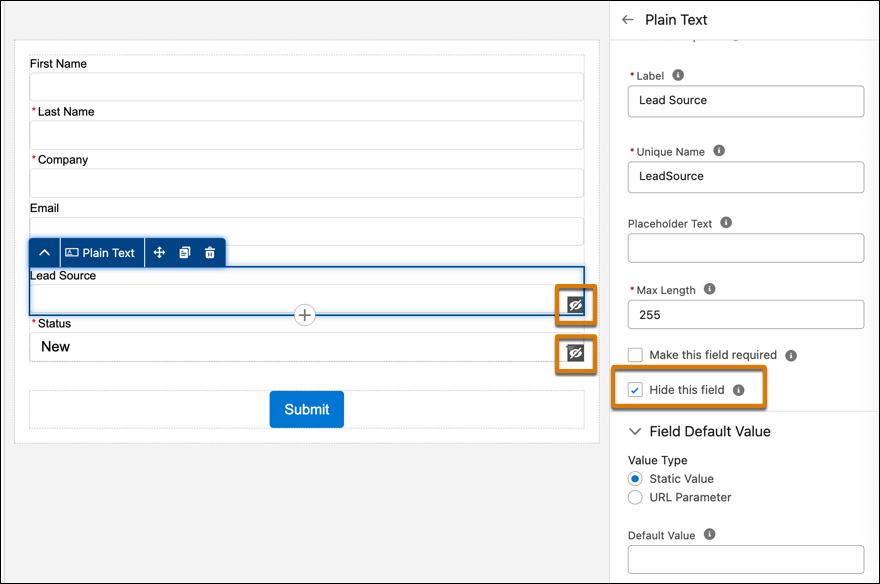 Hidden fields are visible on the canvas while you create or update a form, and an icon identifies these fields as hidden. Hidden fields aren’t visible in preview mode or on a live form. This way, you can get a clear idea of what your end users can see on the form.
 -
To enter a default field value, select Static Value or
URL Parameter.
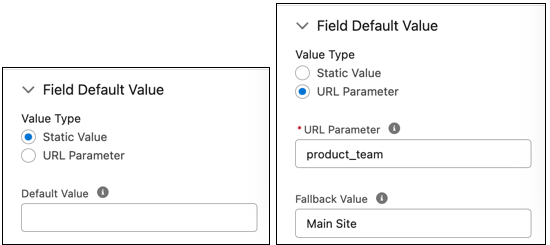
- For Static Value, enter a default value.
- For URL Parameter, enter a parameter from your page URL and include a fallback value. Make sure that the parameter entered in the form matches the parameter used in the URL.