A campaign record includes a detailed summary for each flow that's designed to reflect
certain elements from the Flow Builder canvas. Some features and settings that appear in Flow
Builder aren't available on the campaign, and vice versa. A campaign also includes a
comprehensive overview to help you keep tabs on campaign content across flows, and monitor
campaign performance.
Required Editions
| Available in: Salesforce
Enterprise and Unlimited Editions with
Marketing Cloud Next Growth or Advanced
Edition, and in Starter and Pro
Suite Editions. Your edition determines the options that you have. |
Campaign Record: Navigation
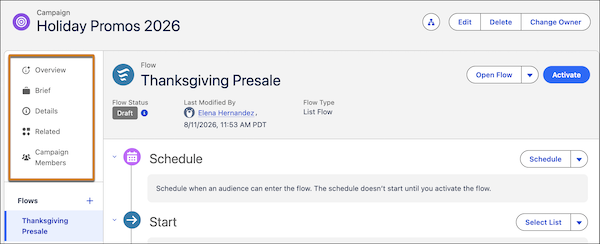
In the campaign sidebar, access the campaign overview, find related assets, and switch
between flows. After an admin adds performance components to campaign layouts, the sidebar
is where you can find available campaign metrics.
The sidebar also contains these items, when they're available.
Campaign Record: Overview
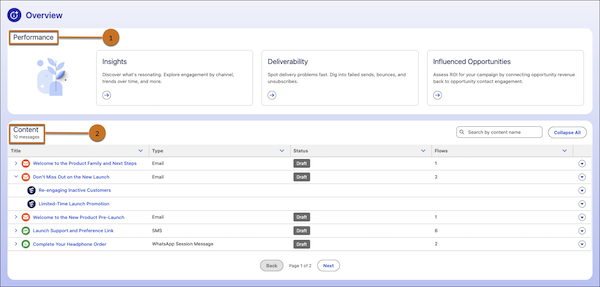
From the Overview tab in the sidebar, review
performance insights and deliverability insights (1). If Opportunity Influence is enabled,
you can access influenced opportunity records from here. In the Content section, get an
at-a-glance view of your campaign content across flows (2). For any piece of content, review
its status and which flows it's used in.
Campaign Record: Flow Summary
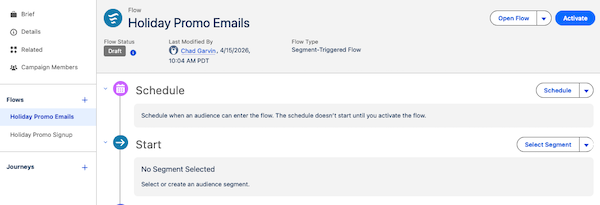
The main content area of a campaign record shows the flow summary. The components vary
depending on the type of flow you’re working with, but you can always open the flow in Flow
Builder from the campaign.
The summary shares information about the Start element of the flow, as well as any message
or time-based wait elements. When a flow contains more than 5 elements, the messages are
listed in a table.
For most basic campaigns, add message or wait elements in the Next Steps section of the
campaign record.
Flow Builder: Canvas
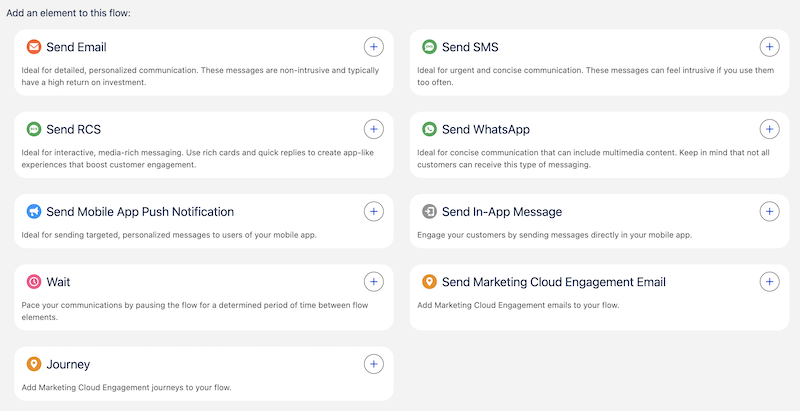
To add additional content or actions to a flow and to configure certain wait elements, work
in Flow Builder. Flows can support advanced elements, such as decision branching. For
details about available flow elements, see Flow Builder Elements for Marketing.