Use the attribute model from your Marketing Cloud Engagement account to determine which
data extensions to synchronize with Marketing Cloud Next, and to visualize how they’re related
to each other.
Required Editions
| Available in: Marketing Cloud Next Pro+, Corporate+, and
Enterprise+ Editions
|
In Marketing Cloud Engagement, Attribute Groups specify how data extensions are related to
the contact record or to other data extensions. As you synchronize your data extensions with
Marketing Cloud Next, review these Attribute Groups to determine which data extensions to
synchronize, and how to create the data relationships that connect them.
To view Attribute Groups in Marketing Cloud Engagement, go to . Then, in the Data Designer, select an attribute group that uses the data
extensions you plan to synchronize with Marketing Cloud Next.
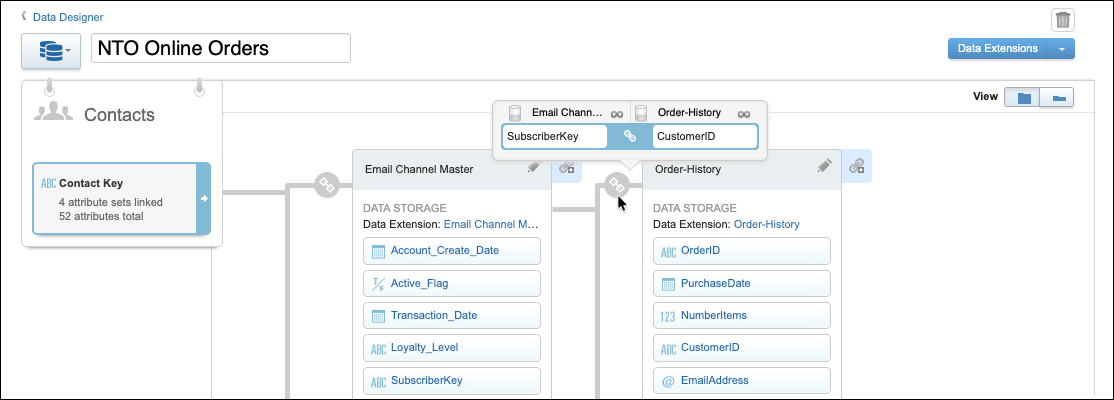
The Data Designer gives a visual representation of the relationships between your data
extensions and the contact model. It’s important to understand these relationships as you
create data relationships in Data 360. Hover over the connection icon ( ) between objects to see which fields connect them, as shown in this image.
When you’re ready to start synchronizing your data extensions with Marketing Cloud Next, see
Synchronize Data Extensions with Marketing Cloud Next.
