
Marketing Cloud Next and Marketing Cloud Engagement use different approaches to non-production environments, also known as sandbox or test environments. If your organization uses Marketing Cloud Engagement+, these different approaches impact the way that you test your marketing programs.
Required Editions
| Available in: Marketing Cloud Engagement Pro+, Corporate+, and Enterprise+ Editions |
Marketing Cloud Engagement+ unites Marketing Cloud Engagement with Marketing Cloud Next and the broader Salesforce Platform in several important ways. For example, you can access Marketing Cloud Engagement data and features from within next-generation features such as Flow Builder, Data 360 segments, advanced reporting, and Agentforce. When you create campaigns that work across both platforms, it’s especially important to test your marketing programs before you move them to your production systems.
This table compares the differences in non-production environments between Marketing Cloud Next and Marketing Cloud Engagement.
| Feature | Marketing Cloud Next | Marketing Cloud Engagement |
|---|---|---|
| Test environment type | Sandboxes | Separate business units |
| Promotion from test to production | Built-in tools for promoting to production orgs | Using Package Manager |
| DevOps tool support | Supports third-party tools such as Jenkins and Github | Limited support for third-party tools |
Suggested Architecture
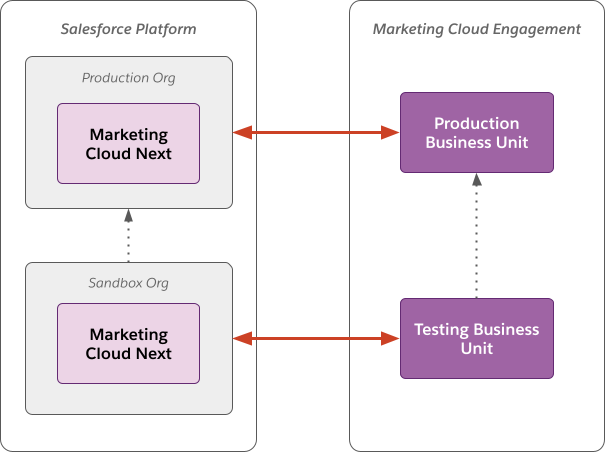
This diagram shows a sample architecture that uses both Marketing Cloud Next and Marketing Cloud Engagement. The red lines represent the synchronization of data between your Marketing Cloud Next org and your Marketing Cloud Engagement business units. The black dotted lines represent the promotion of content and orchestrations from a testing business unit or sandbox org to a production business unit or org.
Build, Test, and Deploy Workflows
After you implement your testing architecture, perform end-to-end tests of your data, content, flows, and journeys. These steps describe how to test a journey and flow in testing environments, and then promote them to production environments.
Required Editions
| User Permissions Needed | |
|---|---|
| To configure Marketing Cloud Engagement: | Administrator account |
| To configure Marketing Cloud Next: |
|
To perform testing in Marketing Cloud Engagement+, start by creating a testing business unit in Marketing Cloud Engagement. Next, create a sandbox org in Marketing Cloud Next.
Connect your production Marketing Cloud Engagement business unit to your production Marketing Cloud Next org. Repeat these steps to connect your test business unit to your sandbox org.
-
Create a sample journey in your Marketing Cloud Engagement testing business unit.
- Create and activate a multistep journey. Make sure that the Entry Source type for the journey is API Entry.
- Use the REST API to inject a contact into the journey.
-
Configure a flow to interact with the journey.
- (Optional) In your Marketing Cloud Next sandbox org, associate the journey with a campaign.
- Create a flow that includes the Send to Journey action. Configure the action to send customers into your test journey.
- Activate and test the flow. Verify that users are sent from the flow into the journey.
-
Promote the changes to production in Marketing Cloud Engagement:
- In your testing business unit, use Package Manager to package the journey.
- In your production business unit, use Package Manager to deploy the packaged journey.
- Configure the entry step for the promoted journey in the production business unit to use an API Event.
- Activate the promoted journey in the production business unit.
-
Promote the changes to production in Marketing Cloud Next.
- In your sandbox org, remove the Send to Journey action from the flow.
- Create a change set that contains the flow and upload it to your production org.
- In your production org, validate and deploy the change set.
- (Optional) Associate the promoted flow with a campaign in your production org.
- In the promoted flow, add the Send to Journey action and configure it to refer to the promoted journey in your production Marketing Cloud Engagement business unit.
- Save and activate the flow.
Other Considerations
There are some limitations to this testing and promotion architecture.
- Journey Customer Keys and Event Definition Keys—In Marketing Cloud Engagement, when you promote a journey from a test business unit to a production business unit, Customer Keys and Event Definition Keys aren’t retained. Manually update the Event Definition Key for the journey in the production business unit. If the content in your journey uses the AMPscript ContentBlockByKey() function, manually update the Contact Keys in the production journey.
- Sender Profile, Delivery Profile, and Send Classification Objects—In Marketing Cloud Engagement, when you promote a journey from a test business unit to a production business unit, the Sender Profile, Delivery Profile, and Send Classification objects aren’t retained. When you deploy the journey using Package Manager, select an existing object in Package Customization. This configuration applies to all email activities included in the deployment. If your use case requires you to use multiple objects across email activities, update each activity manually after you deploy the journey.