You can use parent-child connections when there are multiple data streams that share the same keys, but have unique attributes, and you must share a hierarchy between them. Here are examples of when parent-child can be used.
Use Case 1: Updating a parent data stream with measurements from a child data stream
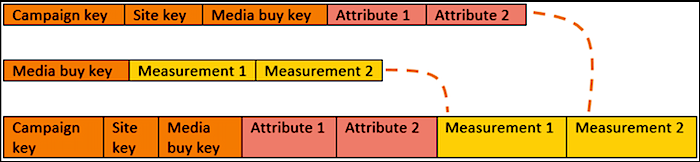
The parent data stream contains entity keys, attributes and measurements, and the child data stream contains dimensions and measurements. You want to update the parent data stream with the measurements that exist in the child data stream to match campaign keys. This means that you can view campaign attributes from the parent data stream alongside measurements from the child data stream. To do this, select the Updates Attributes and Hierarchy option for the Parent data stream.
This image shows how the data appears after the settings are defined for the parent data stream and the child data stream:
Use Case 2: Classifying a parent data stream with attributes from a child data stream
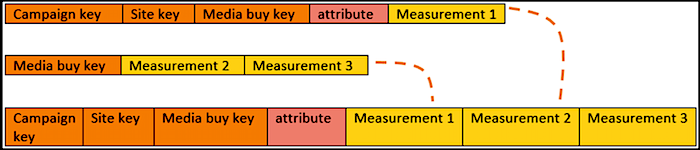
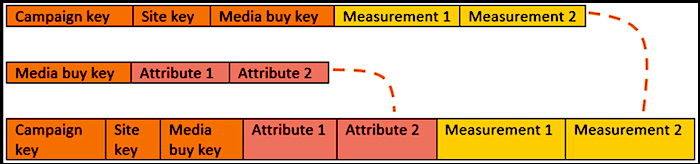
The parent data stream contains dimensions and measurements, and the child data stream contains entity keys and attributes. You want the child data stream to update the attributes of the parent data stream, while keeping the dimension hierarchy of the parent data stream. This means that you can view attributes from the child data steam alongside measurements from the parent data stream. To do this, apply the Update Attributes option to the Child data stream.
This image shows how the data appears after the settings are defined for the parent data stream and the child data stream:
Use Case 3: Entities Only
The parent data stream contains entity keys and attributes, and the child data stream contains dimensions and measurements. You want the parent data stream to update the child's attributes for the matching keys (Media Buy Key), while keeping its dimension hierarchy. This means that you can view dimensions and measurements from the child, alongside the entity keys and attributes from the parent data stream.
To do this, apply the Inherit Attributes and Hierarchy option to the Child data stream.
This image shows how the data appears after the settings are defined for the parent data stream and the child data stream: