
Define a parent data stream to determine a connection between two data streams using a shared entity.
- On the Import tab, click Data Streams list.
- Select the data stream you’re assigning as a parent data stream and click Edit.
- Scroll down to Parent Child.
- From the Parent Data Stream dropdown list, select the data stream to set as the parent data stream.
- To view the streams in the parent-child data pool, click View All.
-
In the Data Updates Permissions section, determine how your data
stream feeds the parent-child dimensional pool with these options:
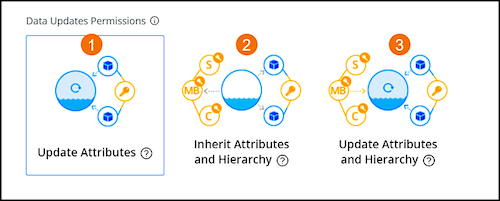
Update Attributes (1) - Updates existing mapped attributes in the parent-child data pool every time the data stream is ingested.
Inherit Attributes and Hierarchy (2) - Prevents existing attributes and hierarchies from being updated.
Update Attributes and Hierarchy (3) - Updates existing mapped attributes and the media buy, campaign, or site hierarchy in the parent-child data pool at every data ingestion.
 Note Selecting this option enables the Override Media Buy Hierarchy option in the More Options section and can’t be disabled.
 - Save your changes.
- To apply the changes, the child data stream must be reprocessed. Recreating your data can have major effects on the data. For more information see Re-Process, Re-Run and Re-Create.
- Select how to reprocess the data, and then click Recreate.