
Use data fusion to unify data that doesn’t naturally harmonize by virtue of the data model based on shared dimension values.
For example, Ads and Fraud Detection datasets are mapped to a generic data stream type. You want to see a unified dataset with Ads data next to Fraud Detection data. Create a data fusion between them because they both share the Media Buy External Key dimension.
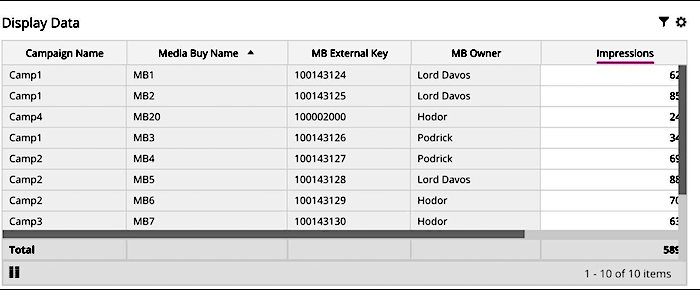
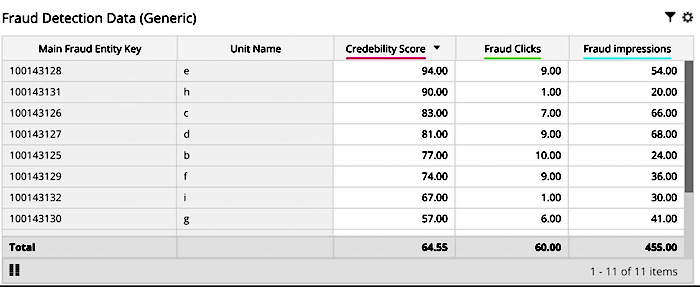
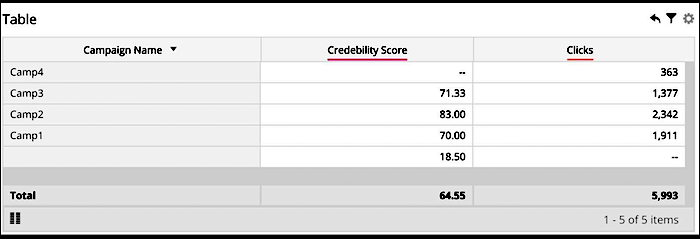
After you set up the data fusion, you can view each dimension to which the fusion was applied with measurements related to the other dimension.
Additional Use Cases
Because data fusion is transitive, you can also apply a data classification rule to Dimension B, which is already fused with Dimension A. In this case, the classification for B is also applied to A.

Data classification is a system-generated data fusion between the Classification Dimension and the dimension to which it’s applied.
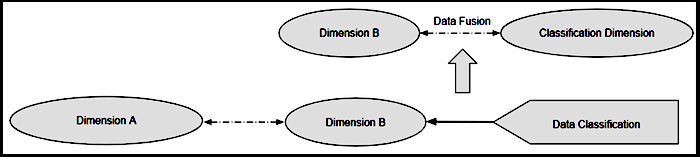
The result is another case of a chain relationship between three dimensions connected by two data fusions, with a linear connection between them.

Data fusion saves you from creating the classification rule for each dimension in a chain of fused dimensions.
You can also apply one data classification to another data classification.

The first data classification is a system-generated data fusion between Dimension A and the classification dimension applied to it, referred to as A1.
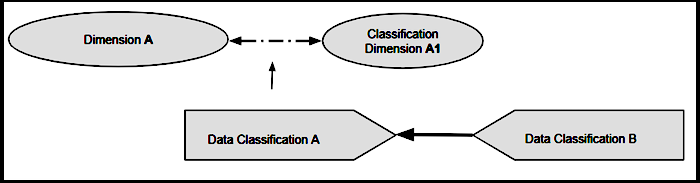
The second data classification is also a system-generated data fusion between A1 and the new classification dimension applied to it in succession, referred to as B1.
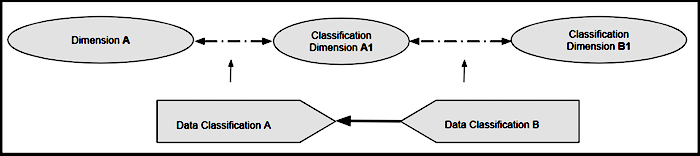
The result is another case of three dimensions, connected by two data fusions, with a linear connection between them. B1 classifications also now apply to Dimension A.

Use data fusion in cases where two different classifications must be applied to the same dimension. Create two classification columns within the same classification file that is used in the data classification. Sometimes these classifications aren’t available within the same file or are created by different teams. In that case, you can use this solution for the same effect.