
Create a data fusion to link two datasets with a shared dimension together.

Note You can’t select overarching entities, calculated dimensions, and Web Analytics Page Path
dimensions for a data fusion.
- On the Harmonize tab, click Data Fusion.
-
Click Add New.
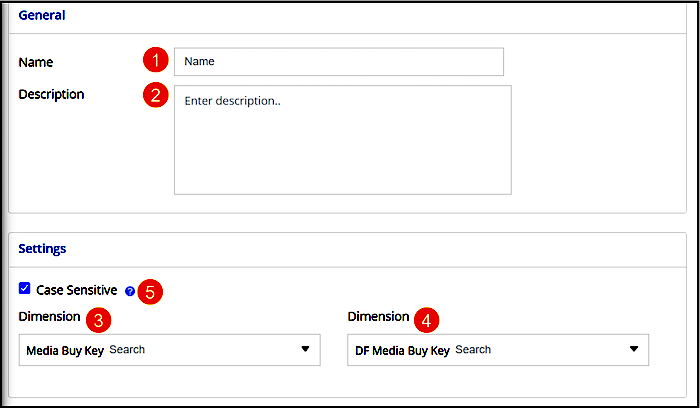
- Give the data fusion a unique name (1) and add a description (2).
- On the left side, the Dimension dropdown (3) lists all the dimensions that are mapped in your workspace. Select the first dimension that you want to create the data fusion for. For example, select Media Buy Key.
- After you select a dimension, the Dimension dropdown on the right (4) lists all the dimensions that can be fused with the first dimension. Select the dimension to fuse. For example, select DF Media Buy Key. The Case-Sensitive option is selected by default (5). MDP doesn’t perform data fusions on dimensional values that don’t follow the same capitalization rules.
- Save your work.