
Create a classification rule to classify your data. You can upload a classification file or define the classification from scratch.
- From the Harmonize tab, select Harmonization Center and then Data Classifications.
- Click Add New.
-
Define the classification rule:
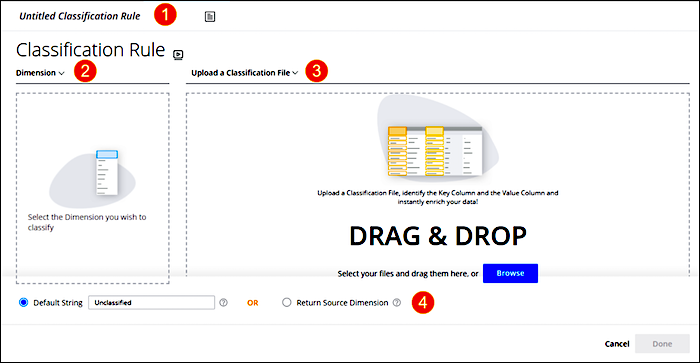
- Enter a name (1).
- Select the dimension the classification rule applies to (2).
- Upload a classification file or create one (3).
-
Determine what to do with unclassified values (4.).
- Select Default String to return a default string whenever unclassified values are found. You can change the string if necessary.
- Select Return Source Dimension if you don’t want the unclassified values to be aggregated.
- After the classification loads, set the Key and Value columns and control the way MDP classifies the values.
-
Click Done.
After the classification rule is created, a data stream is created automatically.