
The Harmonization Center in the Harmonize tab, unifies, enriches, and validates your data in one place. In the Harmonization Center, create and manage your naming convention patterns, classifications, and harmonized dimensions.
The main page contains an overview of your harmonized data.
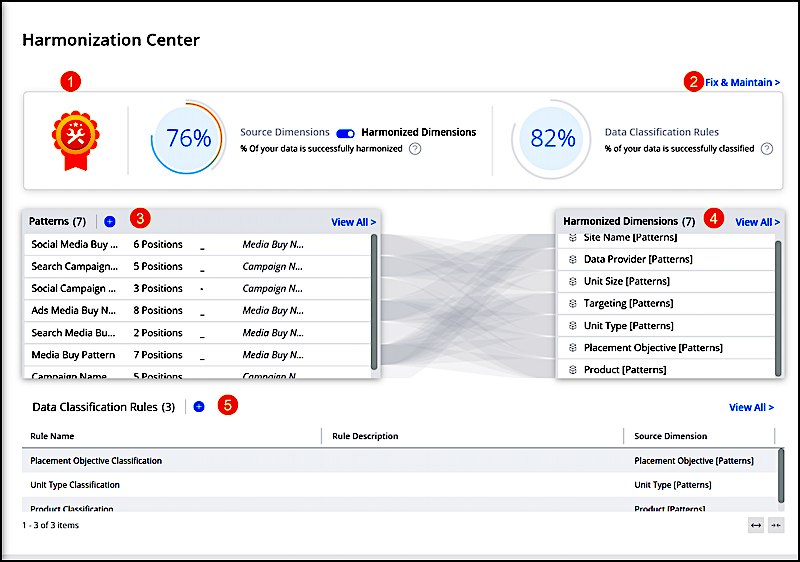
The KPI status bar shows source dimensions, harmonized dimensions, and classification rules (1). Click Fix & Maintain to monitor and remedy issues that occur with data governance directly within MDP (2). View all your patterns (3), harmonized dimensions (4), and data classification rules and perform actions directly from the Harmonization Center.
- MDP Naming Convention Patterns
In the distraction-filled world of a digital marketer, clarity is important. Therefore, when using different marketing platforms, digital marketers often name an activity with all the information in the name. Proper naming allows them to differentiate between the different campaigns, and understand campaign goals and details at a glance without having to look elsewhere. - MDP Data Classification
Classify your data without using a single line of code. For example, classify your sites by news, sports, or entertainment, and so on. Upload a classification file and create a classification rule. - MDP Validate and Maintain Your Harmonized Data in the Harmonization Center
Keeping track of your naming convention patterns, classifications, and harmonized dimensions is overwhelming and time-consuming. Fix & Maintain offers a solution for identifying data that doesn’t adhere to your predefined naming conventions or data classifications. Validate and maintain harmonized data with Fix & Maintain and if issues arise, fix, and adjust as needed.