
If your data stream contains geolocation information, you can use the different geolocation dimensions when mapping.
- On the Import tab, select Data Streams List.
- Create a data stream or edit one.
-
To enter the Mapping page, click Map to
Model. All geolocation dimensions are located under Dimensions.
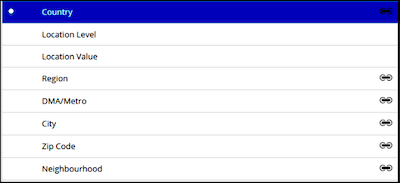
The types of geolocation dimensions differ from country to country because each country has its own way of gathering geographical data. These geolocation dimensions can be mapped:
- Country: A dimension that must be mapped as a predefined field. You can then map any other additional granularity that you want, such as region, city, ZIP code, and so on.
- Location Level: No longer needed.
- Location Value: No longer needed.
- Region: Differs by country. For example, states in the US, provinces in Canada, and so on.
- DMA/Metro: Not available for all countries.
- City: Differs by country.
- Zip Code: Not valid for all countries.
- Neighborhood: Not valid for all countries.
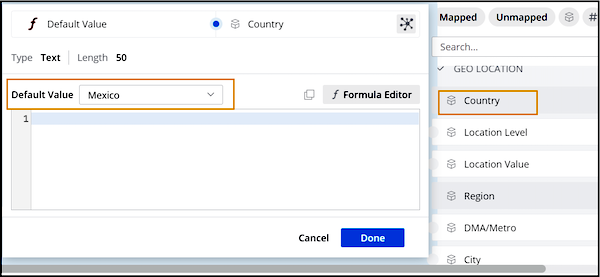
Each dimension has its own properties as well. Some are hard-coded, while others can be edited manually. To view a dimension’s properties, select the dimension, and then on the right-hand side of the page, expand the Default Value dropdown list to view the options. For example, here are the attributes of Country.
 Note Make sure that you always map at the most granular level. For example, if both country and city are present in the uploaded data, map both of them.