
Map source fields to Marketing Cloud Intelligence Data Pipelines fields to connect the data and create a match between your source data and MDP.
- Navigate to the Import tab.
- Expand Data Streams List.
- Create a data stream or edit an existing one.
- At the bottom of the Data Stream page, click Map to Model.
-
To see which fields haven’t been mapped, click Unmapped.
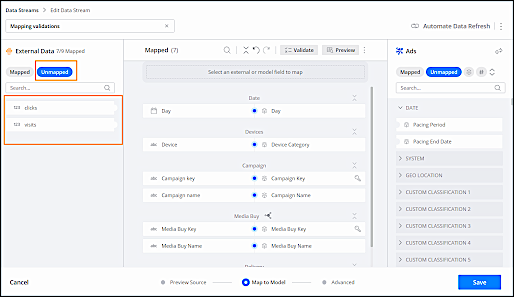
- Click an unmapped field, and then click the MDP field that you want to map it to.
- Click Apply.
- To unmap a field, click Mapped, hover over the mapped field, and then click Unmap. After the field is unmapped, it appears in the External Data list as unmapped.