This content describes the behavior of specific Agentforce actions related to the Marketing Cloud Engagement inputs, particularly focusing on the crucial step of resolving customer identifiers.
Required Editions
| Available in: Enterprise and Unlimited Editions with Marketing Cloud Next |
| User Permissions Needed | |
|---|---|
| To build an agent in Marketing Cloud Next |
Manage AI Agents AND Manage Agentforce Employee Agents |
| To set up and configure data in Data Cloud | Data Cloud Architect |
| To use Agentforce in Journey Builder in Marketing Cloud Engagement | Marketing Cloud Engagement+, access to Data Extensions, Journey Builder, and optionally, Automation Studio |
The Select Journey and Create Journey Content agent actions accept either a
subscriberKey or a UnifiedIndividualId as input. The
action records these values in its respective data extensions. The subscriber key is essential
for deriving value and successfully sending messages in Marketing Cloud Engagement. Although
both inputs are accepted, both are not required.
Think of the Unified Individual ID as a new universal keycard that works across the entire Salesforce campus, but the subscriberKey is the specific door key required to enter the Marketing Cloud Engagement building. If you only present the keycard but not the specific door key, the system tries to find the matching door key based on the general keycard data, ensuring you get access to Marketing Cloud Engagement if a connection exists in the data streams.
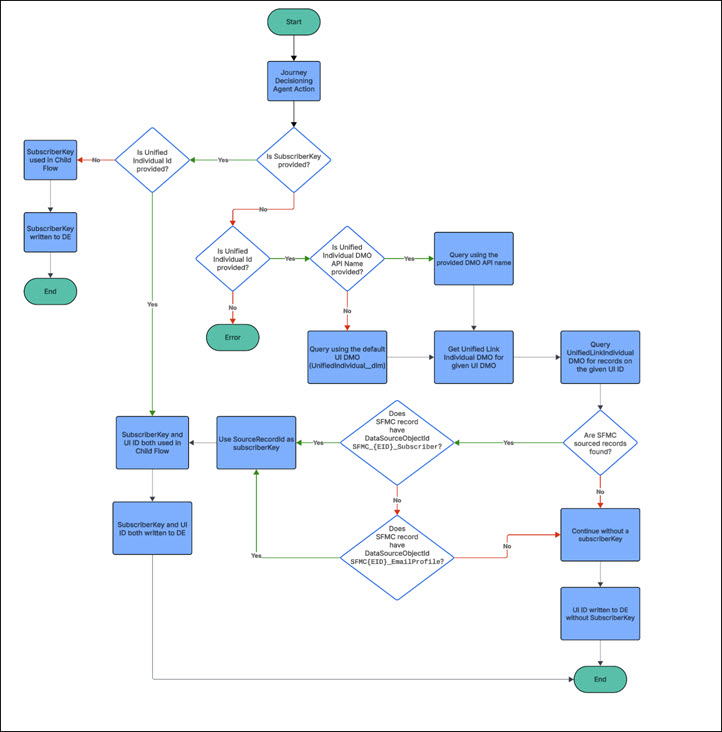
To streamline action execution, the system attempts to resolve the necessary subscriberKey when a Unified Individual Id is provided, but the subscriberKey is missing. This resolution relies on the data following the standard Marketing Cloud Engagement Contact Mappings and Data Lineage Fields practices established through SFMC Data Streams.
SubscriberKey Resolution Logic
The system determines the subscriberKey using this prioritization:
| Scenario | Resolution Logic |
|---|---|
| Subscriber key is provided by the utterance | The action uses that value directly, even if a Unified Individual ID is also provided. |
| A Unified Individual ID is provided, but there’s no subscriber key |
The system attempts to resolve the key by querying your SFMC Data Streams.
|
Template Query
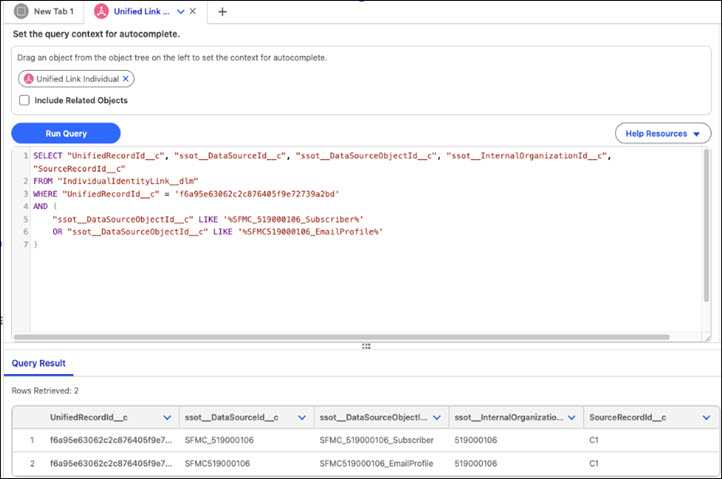
Run a SQL query in the Data Cloud Query Editor to verify whether records can be found for a unified individual. The SourceRecordId__c is the subscriber key.
SELECT "UnifiedRecordId__c", "ssot__DataSourceId__c", "ssot__DataSourceObjectId__c", "ssot__InternalOrganizationId__c", "SourceRecordId__c"
FROM "{UnifiedLinkIndividual DMO Name}"
WHERE "UnifiedRecordId__c" = '{UnifiedIndividual ID}'
AND (
 	"ssot__DataSourceObjectId__c" LIKE '%SFMC_{SFMC EID}_Subscriber%'
  	OR "ssot__DataSourceObjectId__c" LIKE '%SFMC{SFMC EID}_EmailProfile%'
)
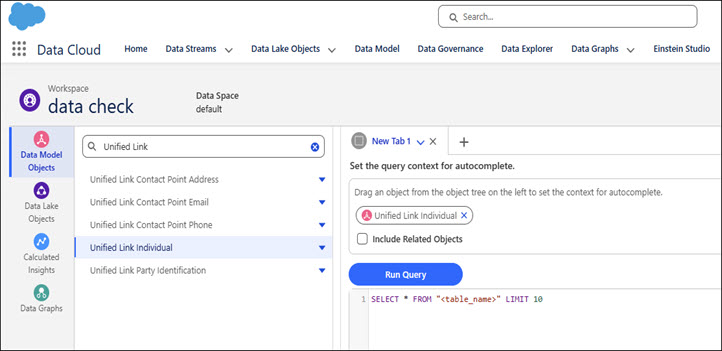
In the Query Editor, use the Unified Link Individual object for your query context.
Copy and paste the SQL query in the query window. Replace the UnifiedLinkIndividual DMO Name and UnifiedIndividual ID in the SQL query. Click Run the query. The results appear below the SQL window.