For each use case you set up in Marketing Cloud Next, several items are automatically created for you. For each journey use case, two flows and two data extensions are created. For a flow-only use case, two flows are created, but since data extensions aren’t applicable, they aren’t created.
Required Editions
| Available in: Marketing Cloud Engagement Pro+, Corporate+, and Enterprise+ Editions |
| User Permissions Needed | |
|---|---|
| To build an agent in Marketing Cloud Next: |
Manage AI Agents AND Manage Agentforce Employee Agents |
| To set up and configure data in Data 360: | Data Cloud Architect |
| To use Agentforce in Journey Builder: | Marketing Cloud Engagement+, access to Data Extensions, Journey Builder, and optionally, Automation Studio |
These flows and data extensions are default elements created when you set up a Journey Decisioning agent use case in Marketing Cloud Next.
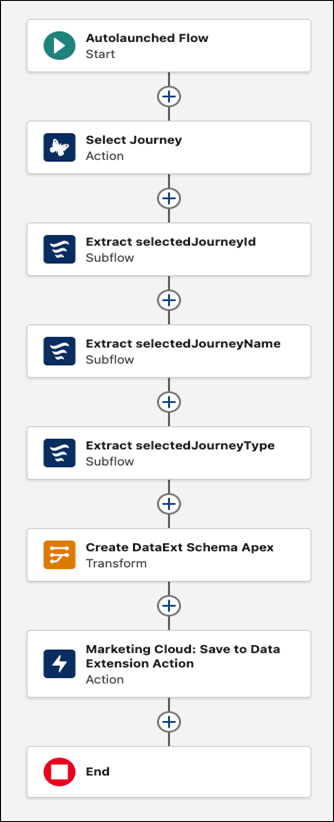
Journey Decisioning Flow
This flow assigns subscribers into the right journey. To find a flow, access the Marketing app from the App Launcher in Salesforce, and then click the Flows tab. Each flow name follows a convention that starts with [AF] for Agentforce, the type of flow, and the use case name. For example, [AF]-Journey Decisioning-Holiday campaign.
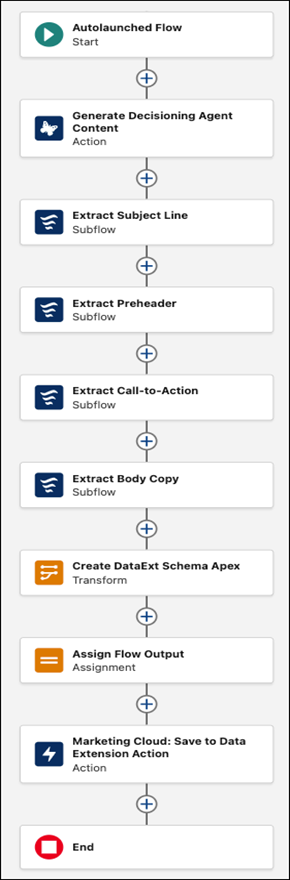
Content Creation Flow
This flow generates personalized content for each subscriber. To find the flows, from the App Launcher, access Marketing Cloud Next, and click the Flows tab. Each flow name follows a convention that starts with [AF] for Agentforce, the type of flow, and the use case name. For example, [AF]-Decisioning Content-Holiday campaign.
To see the Save to Data Extension Action item, you must select a journey for the use case.
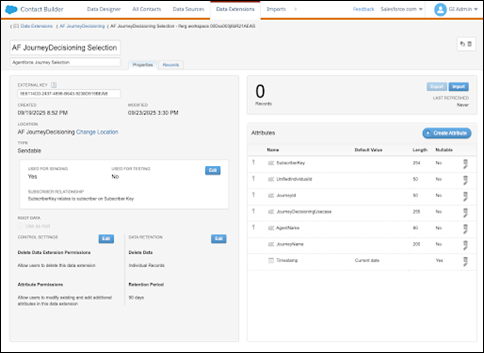
Journey Decisioning Data Extension
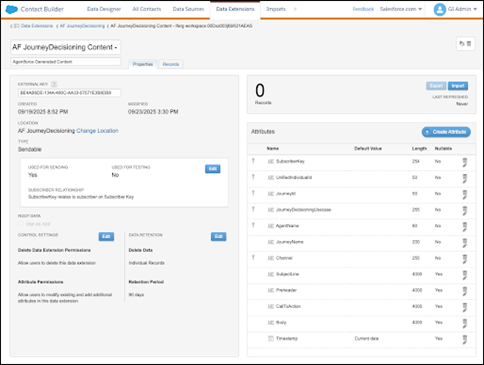
This data extension contains information about which subscribers Agentforce included in each journey. In Marketing Cloud Engagement, on the Data Extensions tab, find the data extension. Each data extension name starts with AF for Agentforce.
Content Creation Data Extension
This data extension contains the individualized subject lines, preheaders, and message copy that each subscriber can use in Journey Builder. In Content Builder, on the Data Extensions tab, find the data extension. Each data extension name starts with AF for Agentforce.