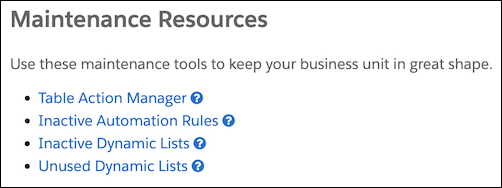
The tables on the Optimizer page show configuration issues and performance improvement measures for your business unit. You can also access other tools to help you assess how efficiently your business unit is running and make improvements.
Required Editions
| Available in: All Account Engagement Editions |
Messages
View nonurgent alerts and feature recommendations in the Messages section by clicking Go to Messages in the notification banner.
High-Level Assessment
When you access Optimizer, you get a high-level assessment of your business unit health.
- Looking Good—Nothing that Optimizer is measuring indicates critical issues or efficiency measures to address.
- Pay Attention—You can take some actions to improve the overall performance in your business unit.
- Action Needed—Optimizer detects critical issues or measures in your business unit, and you must act to resolve them.

Prospect Change Monitor by Feature
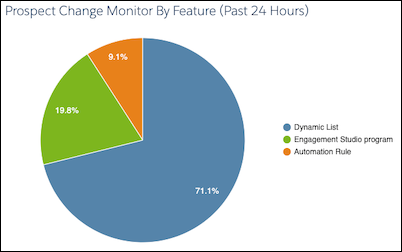
The pie chart breaks down which automations and features resulted in the most changes to prospect records in the past 24 hours.
Click the pie chart to drill in and access the Prospect Change Monitor table.
Configuration Issues
The Configuration Issues table lists critical setup problems that are blocking full access to Account Engagement features. For example, if you don’t have a verified email sending domain, the table lists the steps to resolve the issue.

Performance Improvement Measures
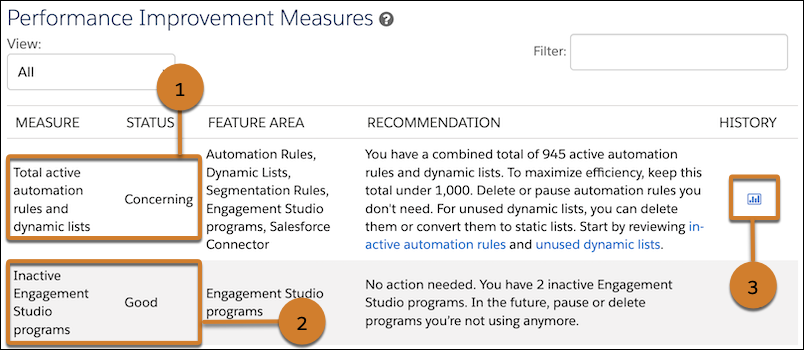
The Performance Improvement Measures table lists recommendations to improve efficiency in your business unit. For example, if you have a high number of automation rules and dynamic lists, Optimizer provides suggestions for maintenance and links to review the rules and lists in your business unit (1). Optimizer also tells you which measures are in good standing, so you know what’s working well (2). When there’s enough data, a clickable history icon shows you how the measure has changed over time (3).
Maintenance Resources
Use the resources and tools to help you manage processing in your business unit. Use the Table Action Manager to free up bandwidth by pausing and resuming actions that are currently processing.