How merging occurs depends on the identity types Personalization receives.
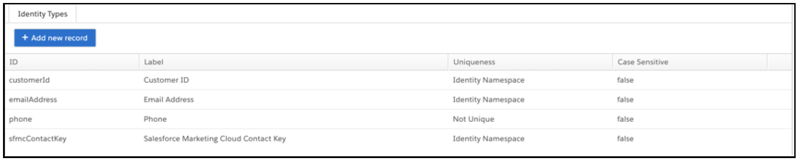
When using the Email Address, Customer ID, Salesforce Marketing Cloud Contact Key, and
Phone identity types, keep the following in mind:
- This setup works best when you have a one-to-one relationship between Email Address,
Customer ID, and Salesforce Marketing Cloud Contact Key.
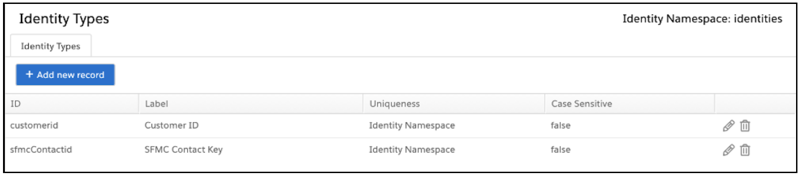
- The Uniqueness value for Salesforce Marketing Cloud Contact Key, Email Address, and
Customer ID is Identity Namespace. Each identity type value can
belong to only one user profile in the dataset, so Personalization can use that value
for identity lookup and user profile merging.
- The Uniqueness value for the Phone identity type is Not Unique. This
identity type value can belong to multiple user profiles, so Personalization can’t use
it for identity lookup or user profile merging. The same phone number can exist for
multiple user profiles, so Personalization uses the Phone identity type for searches
only.
- If there are multiple email addresses for a single Customer ID, Personalization stores
only the most recent email address.
| Merge Scenario 1 |
Resolution |
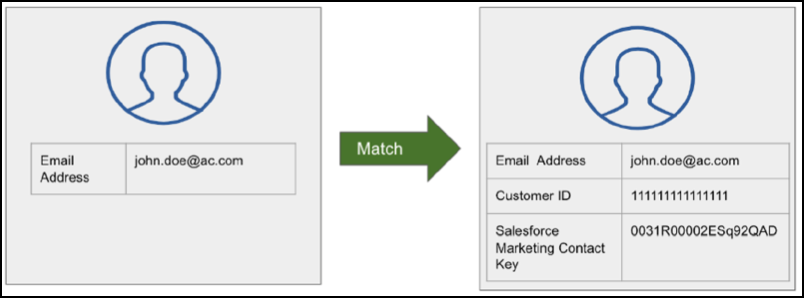
| Personalization receives an event with a single identity type. The Email
Address identity type matches an existing user profile. |
Because the value for Email Address matches an existing user profile,
Personalization assigns the event to that user profile. |
|
| Merge Scenario 2 |
Resolution |
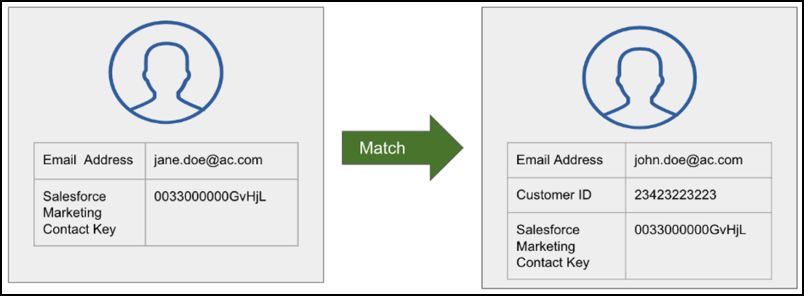
| Personalization Receives an event with Salesforce Marketing Cloud contact
key and email address identity types. The Salesforce Marketing Cloud contact
key value matches an existing user profile, but the email address isn’t the
same as the email address in the user profile. The email address value in the
event has a more recent time stamp than the one in the user profile. |
Personalization assigns the event to the existing user profile using the
Salesforce Marketing Cloud contact key, and updates the email address for the
existing user profile to the email address in the incoming event. |
|
| Merge Scenario 3 |
Resolution |
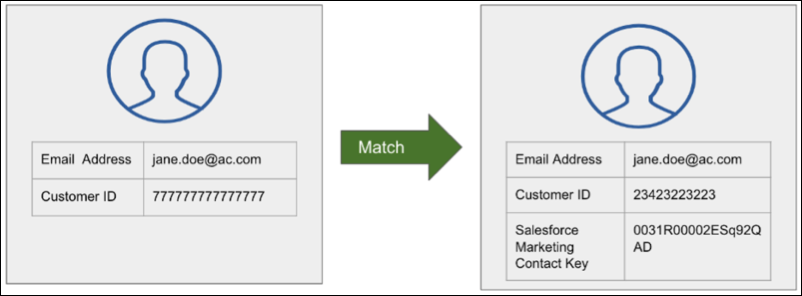
| Personalization Receives an event with customer ID and email address
identity types. The email address matches an existing user profile, but the
customer ID in the event isn’t the same as the customer ID for that user
profile. The customer ID value in the event has a more recent time stamp than
the one in the user profile. |
Personalization assigns the event to the existing user profile using the
email address, and updates the customer ID for the existing user profile to the
customer ID from the event. |
|
| Merge Scenario 4 |
Resolution |
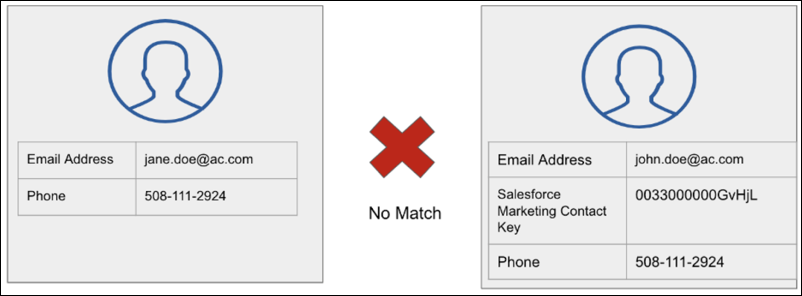
| Personalization receives an event with email address and phone identity
types. The email address value doesn’t match any existing user profiles, and
the phone value doesn’t match any existing user profiles. |
Merging can’t occur because there aren’t any matching identifiers.
Personalization creates a user profile using the data from the event. |
|
| Merge Scenario 5 |
Resolution |
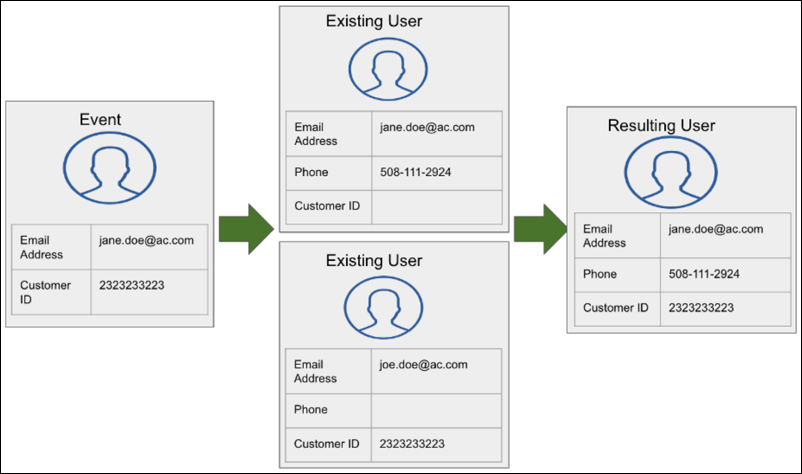
| Personalization receives an event with email address and customer ID
identity types. There are two existing user profiles with identifiers that
match the ones in the event. One profile has a matching email address and the
other has a matching customer ID. |
Personalization merges the two existing user profiles, and then assigns the
event data to the merged user profile. |
|
| Merge Scenario 6 |
Resolution |
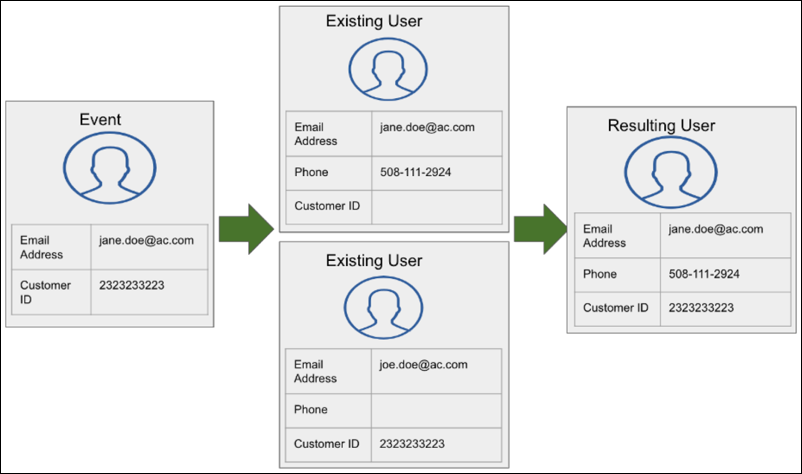
| Personalization receives an event with email address and customer ID
identity types. There are two existing user profiles with identifiers that
match the ones in the event. One profile has a matching email address and the
other has a matching customer ID. However, in the user profile with the
matching customer ID, the email address doesn’t match the email address value
in the event. |
Personalization merges the two existing user profiles and retains the email
address with the latest time stamp, which is the email address value in the
incoming event. |
|
When using only the customer ID and Salesforce Marketing Cloud contact key identity types,
keep the following in mind:
- This setup works best if there’s an internal customer key that is available for web and
offline channels.
- The Uniqueness value for Salesforce Marketing Cloud contact key and customer ID is
Identity Namespace. Each ID value can belong to only one user
profile in the dataset, so Personalization can use that value for identity lookup and
user profile merging.
- If there isn’t a one-to-one relationship with Salesforce Marketing Cloud contact key
and Customer ID, Personalization retains the most recent Salesforce Marketing Cloud
contact key value.
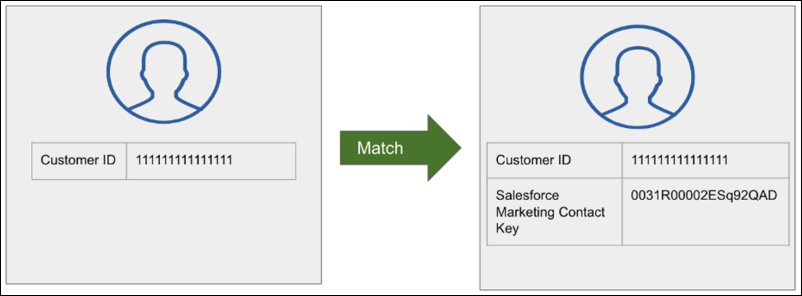
| Merge Scenario 1 |
Resolution |
| Personalization receives an event that contains the customer ID identity
type. The customer ID matches an existing user profile. |
Personalization assigns the event to that user profile. |
|
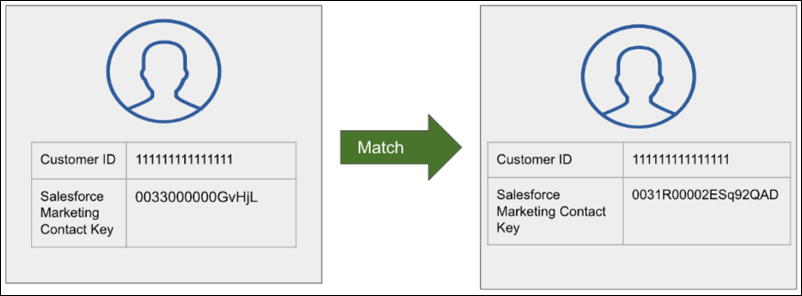
| Merge Scenario 2 |
Resolution |
| Personalization receives an event that contains the Customer ID and
Salesforce Marketing Cloud contact key identity types. The value for Salesforce
Marketing Cloud contact key doesn’t match an existing user profile, but the
value for customer ID does. |
Personalization assigns the event to the existing user profile based on the
customer ID, and updates the Salesforce Marketing Cloud contact key value for
that user profile. |
|
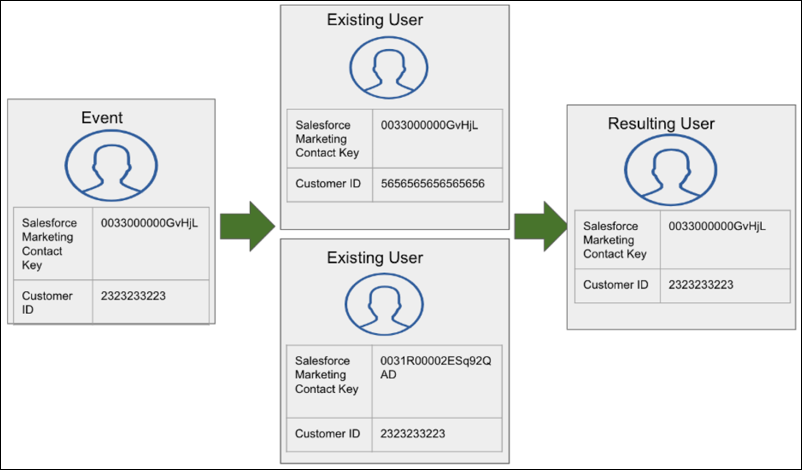
| Merge Scenario |
Resolution |
| Personalization receives an event that contains the Customer ID and
Salesforce Marketing Cloud contact key identity types. There are two existing
user profiles with identifiers that match the ones in the event. One profile
has a matching customer ID and the other has a matching Salesforce Marketing
Cloud contact key. |
Personalization merges the two existing user profiles, and retains the
Customer ID and the Salesforce Marketing Cloud Contact Key values with the most
recent timestamps. |
|
