
Every Marketing Cloud Engagement account must have a STOP keyword so that people sending SMS messages to or receiving messages from the account can unsubscribe.

Note To see an example of a response to a STOP keyword, text STOP to 88769.
HELP or global STOP keywords created in Enterprise 2.0 top-level accounts apply to all business units within an organization using the same short or long code and satisfy regulatory compliance requirements.
Create as many STOP keywords as you need. For example, create STOP keywords in multiple languages.
Include this information in a STOP keyword response:
- A description of the program
- The sponsor of the program, which is generally your business's name
- Confirmation that the user will receive no future messages
- A method to reach customer support, such as email, toll-free phone number, or website

Example
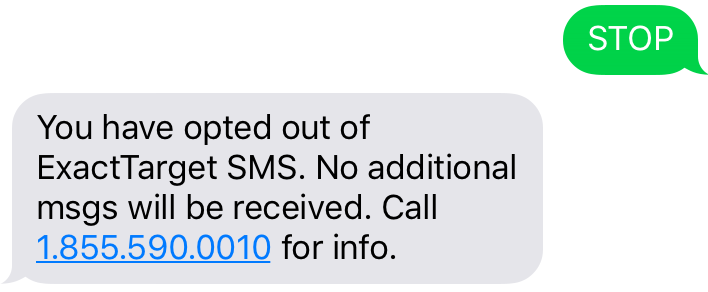 Text STOP to 88769 to see this example.
- Global STOP Keywords
MobileConnect automatically recognizes some keywords as STOP keywords: STOP, QUIT, CANCEL, END, UNSUBSCRIBE, REVOKE, and OPT OUT. If these words occur before the first space in a message, the user is immediately unsubscribed from all keywords associated with that code. - Create a Custom STOP Keyword in MobileConnect
Create a custom STOP keyword for Marketing Cloud Engagement. This topic contains important legal information. - Edit a Custom STOP Keyword in MobileConnect
Edit a custom STOP keyword in Marketing Cloud Engagement. - Delete a Custom STOP Keyword in MobileConnect
Delete a custom STOP keyword in Marketing Cloud Engagement.