
Before you can use events within Marketing Cloud Engagement, you must define the event schema for your applications. When you complete your .csv template, you can upload your file into Journey Builder.
- In the Journey Builder dashboard, click Events.
-
From the dropdown, select Mobile App Events.
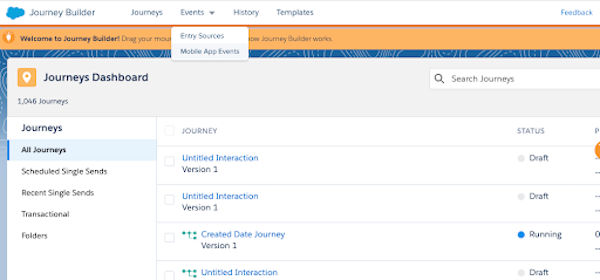
- Click Upload Events.
- To select the apps that you want to use, click Edit.
- Select your apps, and click Summary.
- To upload your event definitions, click Edit.
-
Select whether you want to add and update to your app event schema or overwrite and replace
your app’s event schema.
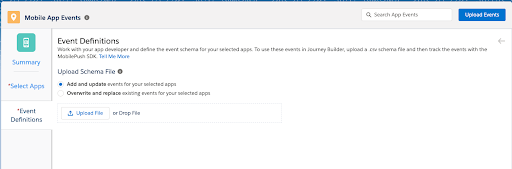
 Note Take caution when updating events that are being used in running journeys. If the newly defined event doesn’t match the inbound data coming from the MobilePush SDK, changing the names or data types of these events can result in errors.
 - Click Upload File, or drag your .csv file.
- Click Upload Events.
- If your file contains errors, correct them, and then upload the file again.
- Click Summary.
Note If you want to edit existing events, upload an updated .csv file, and then select the
option to Add and update events for your selected apps. If you want to
delete existing events, upload an updated .csv file with the removed event, and then select the
option to Overwrite and Replace existing schema for your selected apps.