You can create queries manually using an SQL editor. You can also use or modify one of
the predefined queries in the Query Library. These represent commonly used queries in Query
Builder and SQL formats.
Required Editions
| Available in: Intelligence Reports Advanced |
-
On the Queries tab, click Create New Query.
-
Name your query.
-
Select SQL, and click Create.
-
Write your query.
-
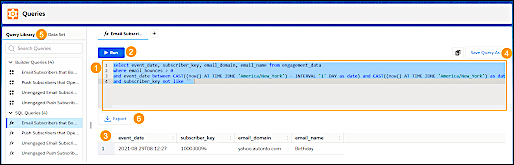
Create your query (1) and then run (2) it to view the results.
-
You can save your query (4) and view it later in the Query Library (5).
-
You can download or export your query results (6) and perform scheduled exports on saved
queries.
To use SQL Queries most efficiently:
- To wrap a value in quotes, highlight the value and then type “ ‘ “
- To run only a portion of the query in the SQL window, highlight the section and then click
Run.
- To copy the value of a cell in the results, right-click the cell and click
Copy.