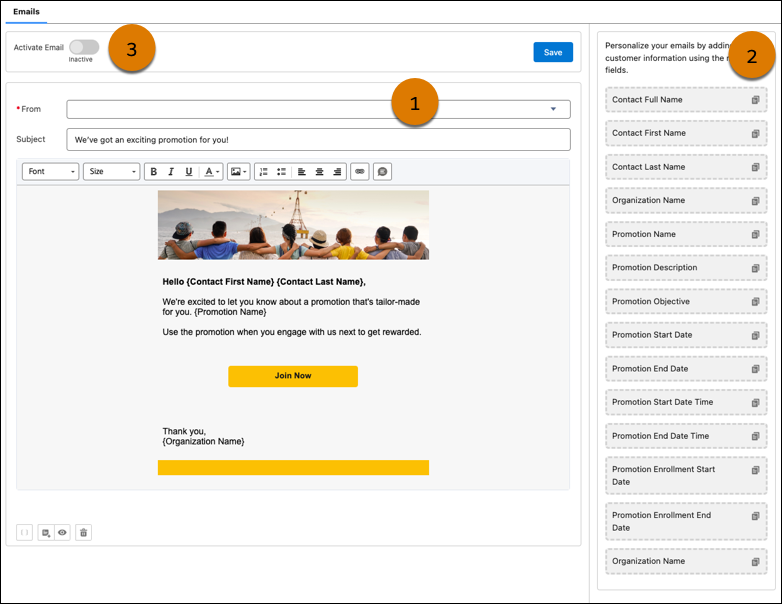
On the Design Distribution Assets step of the wizard, marketing managers can design and
activate the launch email for pricing promotions. Marketing managers get a predefined email and
they can customize the email based on the promotion’s branding requirements. To personalize the
email for customers, marketing managers can add promotion and contact merge fields.
Required Editions
| Available in: Lightning Experience |
| Available in: Enterprise, Unlimited,
and Developer Editions with Real-Time Offer Management |
The Design Distribution Assets step is only available if you:
- Select a Marketing Cloud Engagement business unit for the promotion
- Create promotion rules using one of these types of templates:
- Cart Promotions
- Line Level Promotions
- Unit Price Promotions
- Combo Promotions
- Custom Promotions
Organization-Wide Email Address for Sender (1)
The promotion is sent from an organization-wide email address that the admin sets up. If
you don’t find the email address that you want to use, ask your Salesforce admin to add the
email address as an organization-wide email address.
Merge Fields for Email Body (2)
The email includes a list of Contact object and Promotion object merge fields that you can
add to the email body. The merge fields resolve to the value of the fields in the context of
the customer who receives the email and in the context of the promotion that the email
belongs to.
Email Activation (3)
After you design the promotion, activate the email. Only activated promotion launch emails are
sent to customers. The email is automatically sent using the Engagement feature Journey
Builder. After you activate the promotion, the Launch Promotion journey is automatically
created in the promotion’s Engagement business unit.
The journey sends emails to only the customers that you select as the promotion’s target
audience in the Define Promotion Eligibility step of the guided flow.