
On the Select Personalization Configuration step of the Quick Promotion wizard, marketing managers choose which values to personalize and select the predictive AI source that generates the values.
Required Editions
| Available in: Lightning Experience |
| Available in: Enterprise, Unlimited, and Developer Editions with Real-Time Offer Management. Additionally, you need Data Cloud and Personalization. |
This step is available only when a marketing manager selects New Personalized Promotion from the Promotion Console tab. An admin must turn on personalized values for promotion rules before marketing managers can select this option. See Turn On Global Promotions Management.
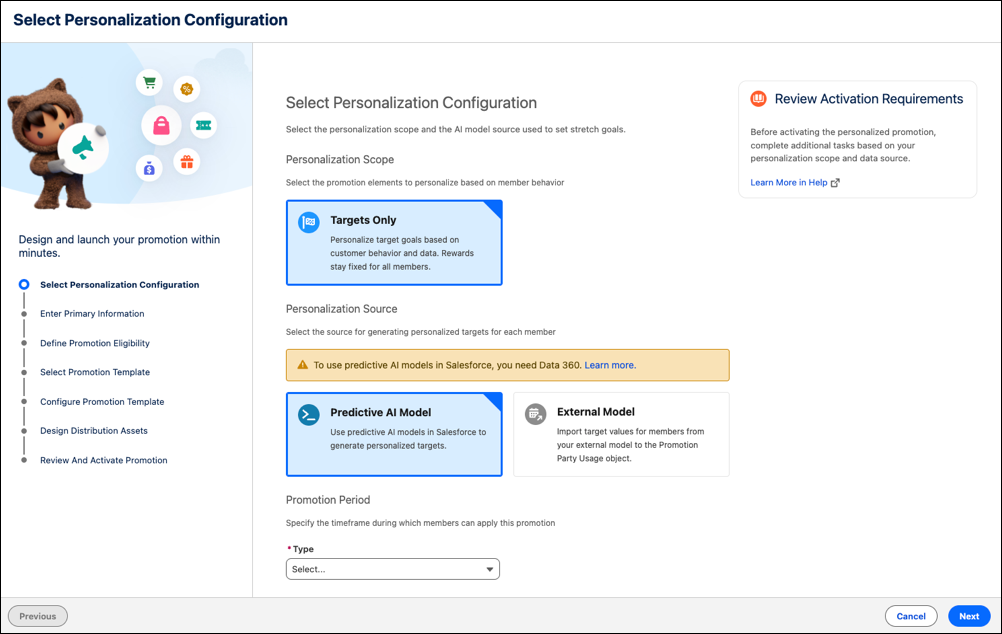
Personalization Scope
Select the promotion elements that you want to personalize based on customer behavior. Currently, Targets Only is the only available scope. With this option, a rule's qualification amount or quantity is personalized for each customer, but the promotion's rewards stay fixed for all customers.
Personalization Source
Select the source that's used to generate each customer's personalized target:
- Predictive AI Model—For Loyalty Promotions, use predictive AI models in Salesforce to generate personalized targets.
- External Model—Import target values for customers from your external model.

Promotion Period
Specify when customers can apply the promotion. The available options depend on the selected Personalization Source. For Predictive AI Model in Salesforce, Salesforce supports specific promotion periods like date, week, or month. For External Model, specify when the promotion starts and ends.