
Download QA templates for testing and validating data sources directly to your workspace. You can then access the template whenever needed. A new page is created in your collection for each template you select. You can then go directly to the page and start checking your data sources.
Required Editions
| User Permissions Needed | |
|---|---|
| To run Marketplace apps: | Admin, Power Users, or Viewers |
- In Marketing Cloud Intelligence, on the Marketplace tab, select Apps.
- Click Installed Solutions, and then select the Implementation Templates app.
- From the Data Provider QA Templates dropdown, select the data source templates that you want to download to your workspace.
- From the QA Validation Templates dropdown, select the validation templates that you want to download to your workspace.
-
From the General Templates dropdown, select the templates that you
want to download to your workspace:
- Discovery Instructions—Use this template as a checklist when sitting with a customer during the discovery phase.
- Email Optimization—Use this template to check campaign performance.
- MPO—Use this template to check Media Performance Optimization.
-
To add the templates to your workspace, click Create. The
Visualize tab opens showing the last created dashboard page displayed
by default. A collection and dashboard page is created for each template that you selected.
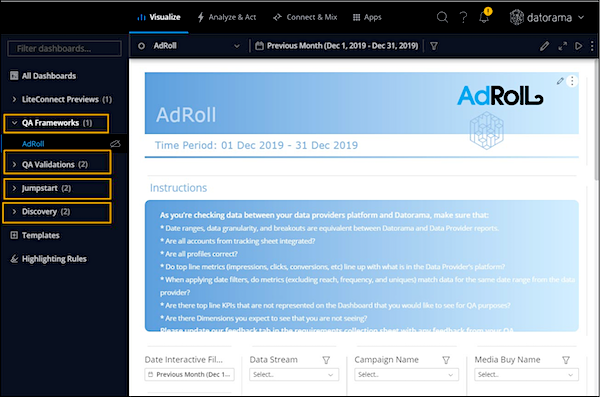
QA Frameworks Contains a dashboard page for each data source that you selected. QA Validations Contains a dashboard page for each validation template that you selected. Jumpstart If you selected MPO or Email Optimization, a separate collection is created with a dashboard page for each template. Discovery f you selected Discovery Instructions, two dashboard pages are created: Discovery Instructions and Rollout Instructions. Rollout Instructions If you selected the Rollout Instructions template, in addition to the new collection and dashboard page, calculated dimensions are also created. Review the Rollout Instructions template to see how to use these calculated dimensions.