A maximum of 9 underlying entities are created with the Media Planning Center app.
- 1 Generic data stream
- The budgeting grid is turned into a report, which is uploaded into this data stream. Upon installation, this report only has dimension values with ‘nulls’ for the budget figures. After installation, every time the grid is updated with budget figures, a new report is created with the latest figures, which replaces the previous matching data that was there before.
- A maximum of 6 calculated dimensions
- The total number is per the number of selected dimensions (levels). Each of these calculated dimensions (one for each budgeting level) harmonizes the budget data sourced from the generic data stream. It correlates delivery data (historical actuals) sourced from the relevant data streams in the workspace, and aligns figures from both sources by the same calculated dimension value.
- 2 Calculated measurements
- Calculated Cost Per Measure—Calculates the average cost per unit as per the relevant KPI defined for each objective (if multiple KPIs are used). It divides the selected Spend measurement by the relevant KPI measurement for each case.
- Calc Budget— Used to apply a LIFETIME aggregation to the mapped budget figure. This is required because the mapped budget figure undergoes a certain calculation from within the mapping, so it can apply to any date within the selected date range. This ensures that there’s always a figure, which correctly shows the latest number that isn’t impacted by the mapping calculation.
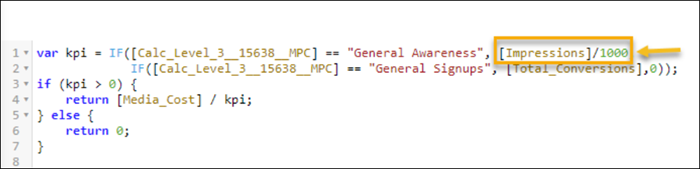
Customize the Calculated Cost Per Measure calculated measurement if you want to apply your own logic to this measurement. This measurement calculates cost per unit as a straightforward division of the total cost by total KPI regardless of the cost type as can be seen in this example:
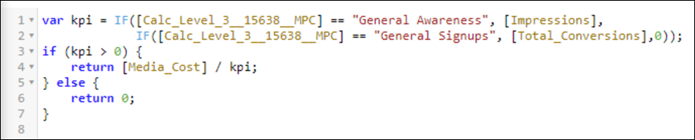
If you prefer to calculate the average CPM and not the average cost of a single impression, change the calculated measurement. For example, the average cost per 1,0000 impressions.