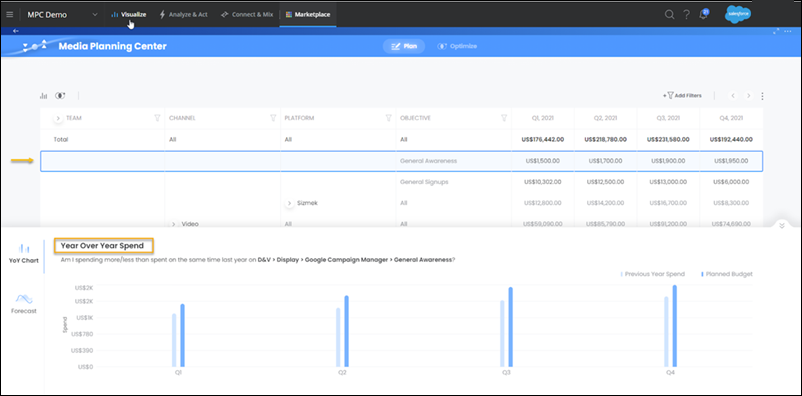
Whenever you highlight an entity on the grid, an analytic display appears at the bottom presenting two analytic types, Forecast, and YoY (Year-over-Year). The data that displays is per the level that you’re currently highlighting, meaning if you drill up or down, the numbers change accordingly.
Forecast
The forecast section displays the effect that the budget has had on performance in the past, and it predicts what the performance is likely to be in the future. This prediction is based on a computation of past performance data and future budget. It offers a selection of forecasting methods from a dropdown at the top right-hand side of the display:
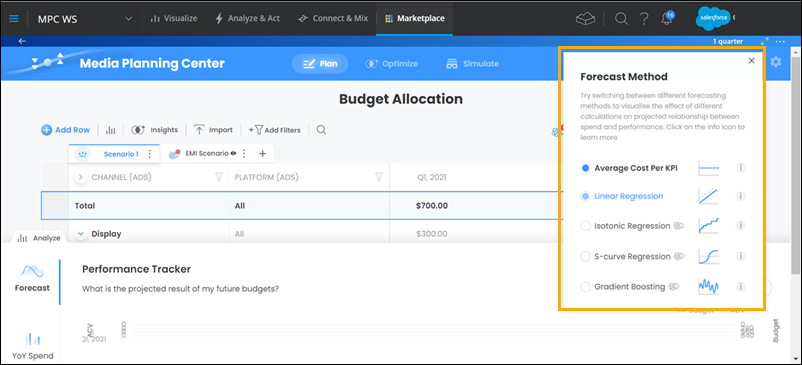
To view an explanation of each forecasting method, click the icon beside the method itself.
The forecasting methods vary in complexity from simple to complex. The first two methods predict results even with relatively little data, however, the advanced methods require at least 10 historical points of reference. If you use monthly increments, when using one of the advanced methods, you need at least 10 months’ worth of past data.
Forecasting isn’t displayed as an absolute number, but rather as a range in which the true number assuringly lies, for example, the confidence interval. The confidence interval range is always spread over two standard deviations from the mean for all methods. In general, the more data you have and the more accurate it is for the period scoped in the past, the more accurate the forecasting is likely to be.
Forecasting aligns your budgeting decisions with specific targets. For example, in cases where you must achieve a certain number of conversions, but the selected forecasting method suggests that this target will be missed. You can try to reallocate budget in-line with the forecasting at the expense of other allocations that are less target sensitive.
YoY Analysis
This analysis shows you the previous year’s spend for the selected highlighted entity in the selected time frame. This analysis can serve as a benchmark. If for example, you decide to spend 15% more this year than you did the year before, you can immediately see how much you spent on every budgeted entity. It also provides you with a seasonal trendline. You can see all of the previous year’s peaks and troughs, which can be related to recurring events and are worth considering this time around.