
If for some reason you no longer need an app and you want to remove it, you can use the uninstall option.
Required Editions
| User Permissions Needed | |
|---|---|
| To uninstall an app: | Admin |
When uninstalling you must decide what to do with the app’s underlying entities. You can either keep them or delete them. Before you decide, keep this in mind.
- If you chose to delete underlying entities, if any of the underlying entities are in use, they aren’t deleted.
- If you decide to keep underlying entities they remain in the system, but they aren’t connected to any app.
- All underlying entities created by apps contain the app name and version in the entity name.
- Access the Marketplace main page from the Marketplace tab in Marketing Cloud Intelligence.
- Click Go to Installed Solutions.
- Select the tile of the app you’re uninstalling.
-
Click the options button and then select Uninstall.
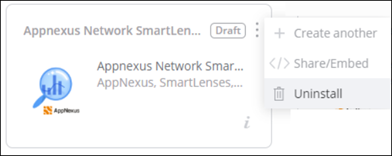
- Select if you want to delete or keep the underlying entities.
- Click Uninstall.