
Create a naming convention pattern to deconstruct your dimension, which is in a naming convention form, and create harmonized dimensions for each segment of your naming convention. A harmonized dimension acts like any regular calculated dimension and can be used in the platform, for example in reports.
Required Editions
| User Permissions Needed | |
|---|---|
| To create naming convention patterns: | Admin |
- From the Connect & Mix tab, select Harmonization Center, and then Patterns.
- Click Add New.
-
Define the general details:
- Enter a descriptive name so you can easily identify the pattern later.
- Select the Source Dimension that holds the pattern you want to deconstruct.
- To filter by a certain data source or data stream, click Add Filter.
- Select List to include current data streams.
- Select Contains to include future data streams.
- Select the structure that best suits your naming convention, or select Manual Setup to manually create a naming structure from scratch. Then, enter the number of positions and delimiters.
- Click Apply.
-
Construct your pattern.
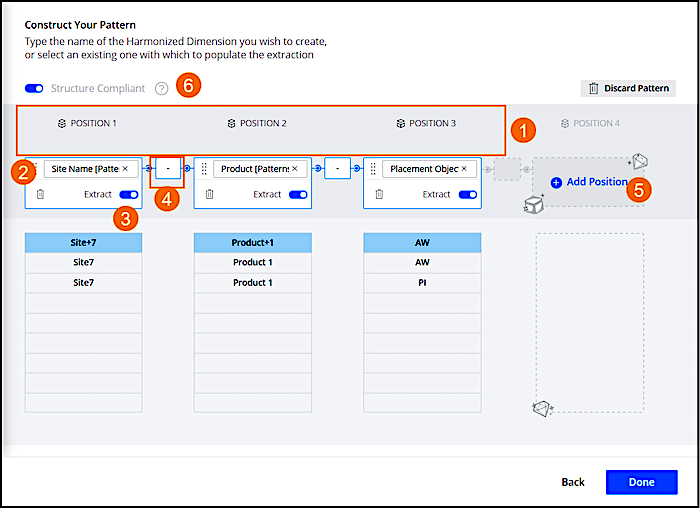
- Marketing Cloud Intelligence breaks down the original values of the source dimension according to the naming structure (1).
- Navigate to each position and type in the name of the new harmonized dimension or select one from the dropdown (2).
- The Extract toggle is turned on by default. A harmonized dimension is created for each position after the pattern is created. If you don’t need harmonized dimensions, for example for a serial number, then turn off the toggle (3).
- To change the delimiter, enter the required delimiter (4).
- Click Add Position and continue selecting the dimensions (5). For example, if your naming convention contains an additional position.
- Structure Compliant is on by default. Extractions occur for dimension values that adhere to this pattern's exact structure. For example, dimensions that have the same number of positions as the dimension that you’re creating this pattern for (6). This toggle has different results depending on the pattern type. For more detailed information, see Multi Delimiter Patterns and Structure Compliance.
-
Click Done.
New harmonized dimensions are created according to how you defined the extraction when creating harmonized dimensions. For example, if we look at this naming convention: Product_TargetAudience_Offer_PlacementType_CreativeType.When breaking it down, you get 5 positions, where each position produces a harmonized dimension. In this image, the naming convention pattern produced 5 different harmonized dimensions: Product, Target Audience, Offer, Placement Type, and Creative Type.
